Territory routing
Route leads by zip code, state or city, automatically, on every lead.
TL;DR
Assign each buyer the zip codes they accept and LeadMove routes every lead by zip, state or city the moment it arrives, with caps, time-of-day rules and weighted distribution. Territories can be exclusive or shared and priced per lead, with a backfill buyer so nothing is left unrouted. Published pricing from $149/mo, self-serve, no sales call.
From $149/mo · no setup fee · 14-day free trial · live in 15 minutes.
Why territories end up in a spreadsheet
Most teams start with a tab per buyer and a zip list copied from a map. It works until two buyers claim the same zip, a buyer hits the number they can handle by noon, or a lead from a zip nobody covers sits in an inbox. Each of those is a rule you are enforcing by hand. LeadMove holds those rules on the pipeline and applies them to every lead, so the spreadsheet becomes the thing you export at the end of the month, not the thing you route with.
Three ways to draw a territory
A territory is a condition on the zip, city or state field of your lead, combined with the other conditions you already use: score, source, time of day.
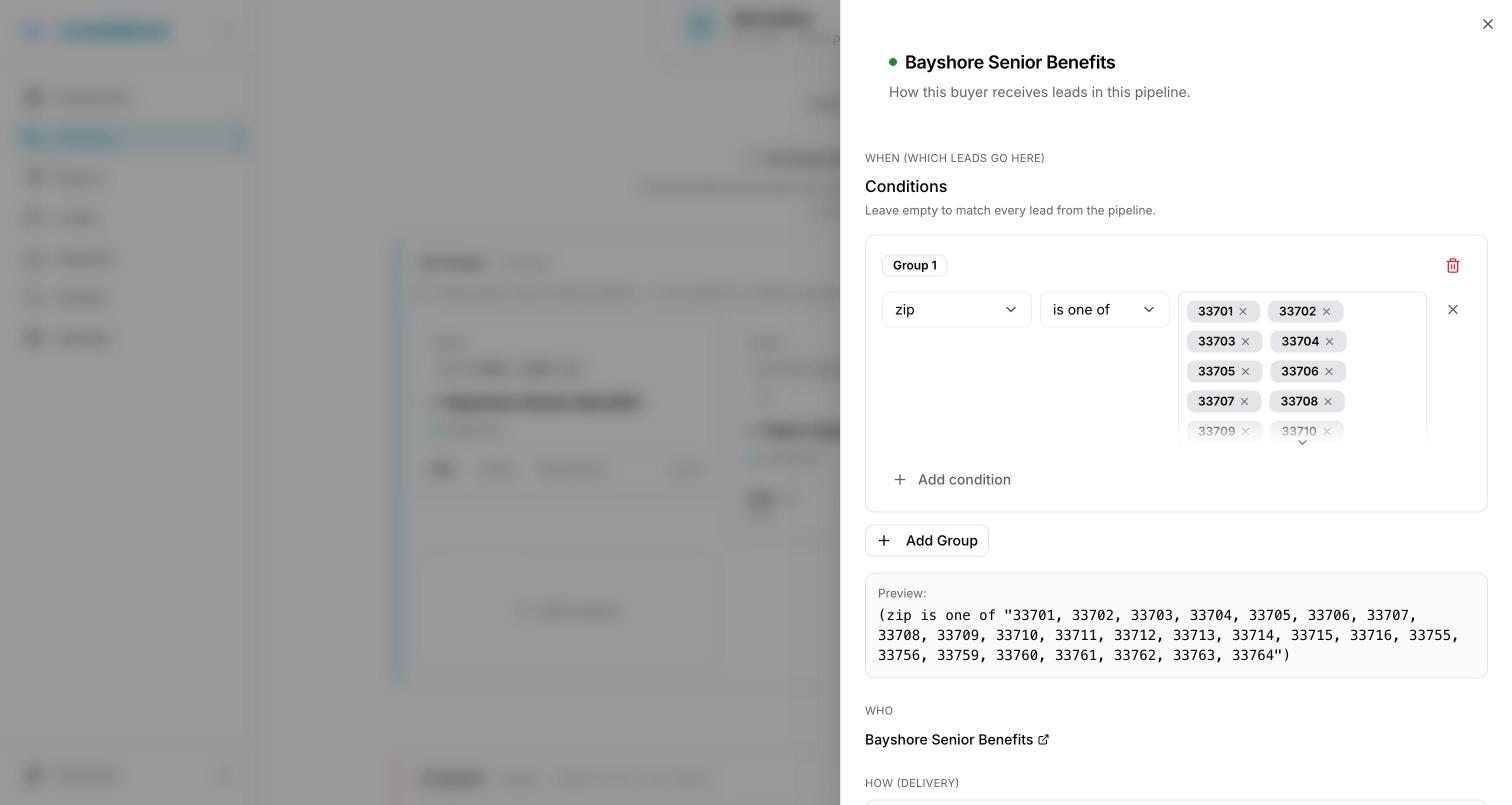
A pasted list of zip codes
Copy a column of zip codes from a spreadsheet and paste it into the condition. Each zip becomes its own entry, and the rule matches any lead whose zip is on the list. Add or remove a zip later without touching anything else.
A zip prefix for a whole area
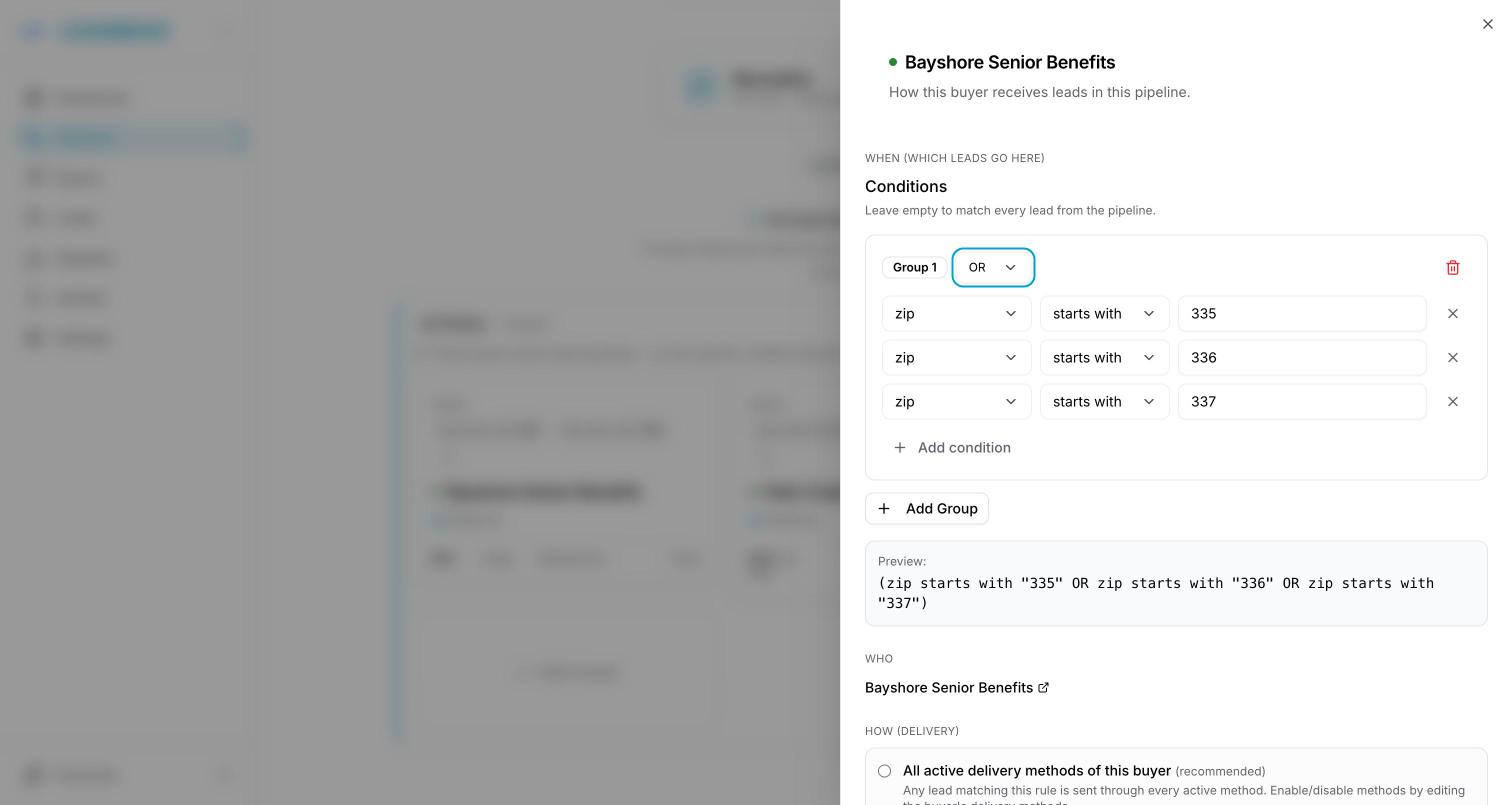
Every US zip shares its first three digits with its neighbors, so one condition on "starts with 335" covers the whole Tampa Bay area. Group several prefixes with OR to build a region in four clicks instead of four hundred.
A state or city gate on top
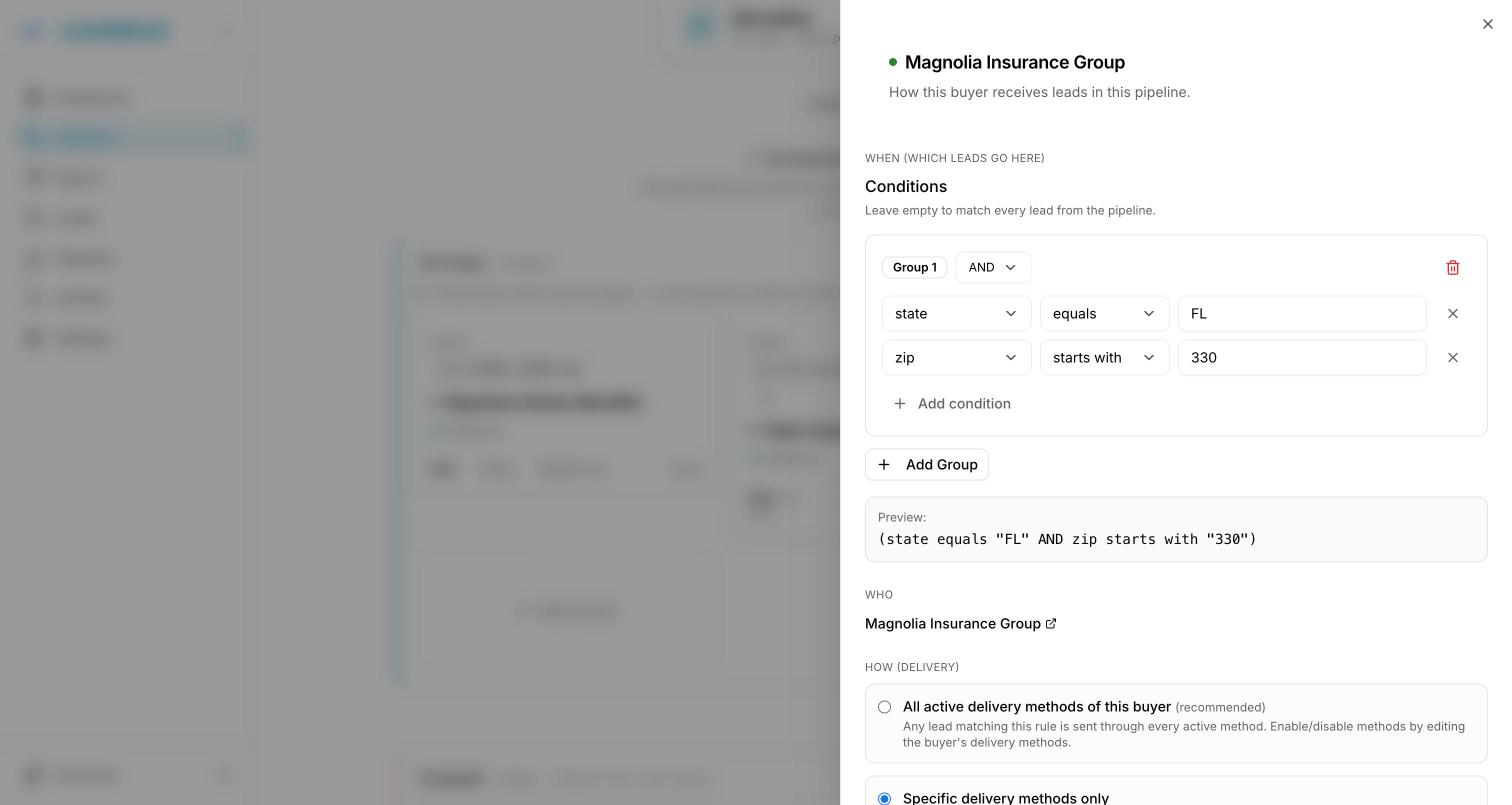
Add "state equals FL" above a zip condition to be sure a lead with a mistyped zip never crosses a state line, or route a whole state to one buyer and split the cities below it between others. Conditions stack, so licensing, appointments and service areas fit the same rule.
When territories overlap, or nothing matches
Exclusive or shared
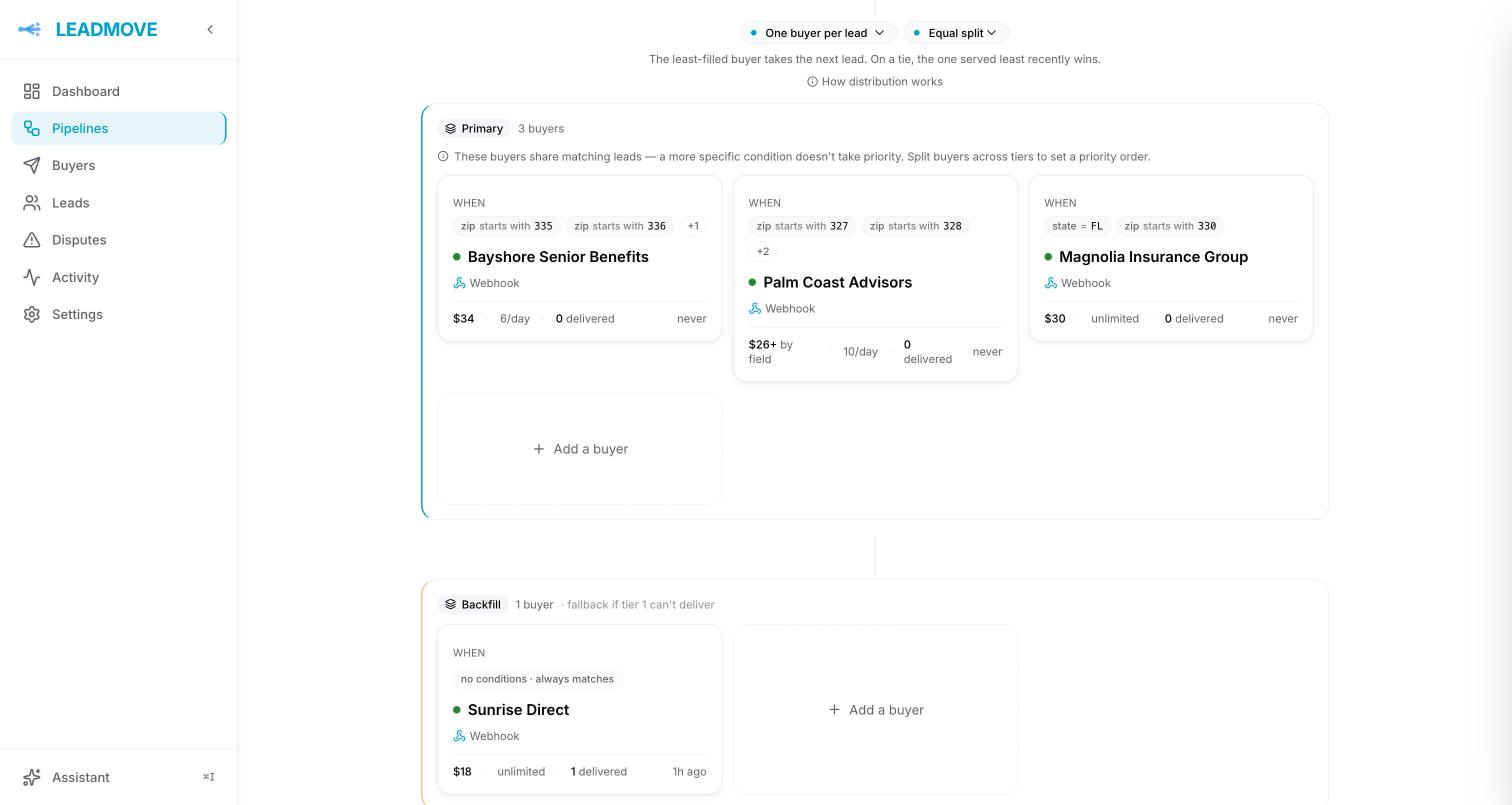
Set the pipeline to one buyer per lead and a zip goes to a single buyer. Set it to shared and the same zip can go to two or three, each at their own price per lead.
Tiers decide who is asked first
Put your territory buyers in the primary tier and a no-conditions buyer in a backfill tier. A lead is offered to the primary tier first and falls through only when no territory matches or every matching buyer is full.
Caps and hours are respected
A buyer who reached their daily cap, or whose hours are closed, is skipped for that lead and the next eligible buyer takes it. You choose whether closed hours hold the lead or pass it on.
Every decision is on the record
Each lead carries its routing trace: which rules matched, which buyer was skipped and why. When a buyer asks why they did not get a lead from their zip, the answer is one click away.
Set it up in ten minutes
- 1
Add the zip field to your pipeline, or map the field your form already sends.
- 2
Add a buyer, open its rule, and add a condition on zip: paste a list, or use "starts with" for a prefix.
- 3
Choose exclusive or shared for the pipeline, set each buyer's cap and price, and add a backfill buyer with no conditions.
- 4
Send a test lead with a zip from each territory and read the trace.
From Claude or ChatGPT
YouGive Bright Solar the zips starting 335, 336 and 337 in the Florida pipeline.
The rule comes back as a card: three conditions spelled out as field, operator and value, and what they would have matched in your last 30 days of leads. It arrives switched off; you read it, then you turn it on.
Run your account from Claude or ChatGPTWhere zip routing is used
Solar installers
Each installer owns a set of zips, exclusive, with a daily cap that paces the day.
Mortgage and state licensing
A loan officer only receives leads from states they are licensed in, on every single lead.
Insurance agents by appointment
Route by state to appointed agents, then by line of business inside the state.
Home services by service area
A contractor's service area is a zip list, so the job never lands outside their range.
Medicare and other county-based programs work the same way: a county is a list of zip codes, and a list is one paste away. Medicare lead distribution.
Zip code routing, FAQ
What if two buyers want the same zip code?
Both can have it. On a shared pipeline the lead goes to each of them, at each buyer's price. On an exclusive pipeline LeadMove picks one according to tier, weight and caps, and the trace shows why. If a buyer should be tried first, put them in a higher tier.
What happens to a lead from a zip nobody covers?
It goes to your backfill buyer, if you set one up with no zip condition in a lower tier. If there is no backfill, the lead stays in your dashboard as unrouted, and you can send it to a buyer by hand or fix the territories and rerun distribution.
Can I paste a few hundred zip codes at once?
Yes. Copy the column from your spreadsheet and paste it into the condition: LeadMove splits on commas, semicolons and line breaks, and each zip becomes its own entry. You can search, add or remove entries afterwards without repasting.
Can I route by radius, for example 25 miles around an office?
Not as a radius setting. What works today is a zip prefix or a pasted list: the first three digits of a zip cover an area, and a list drawn from a map covers a shape. Most radius requests turn out to be a fixed set of zips that rarely changes.
Can I sell the same zip as exclusive to one buyer and shared to others?
Yes, by using two pipelines fed by the same source, or by combining tiers and prices on one pipeline. Cross-pipeline duplicate detection keeps a lead from being sold twice where you did not intend to.
Do Canadian postal codes and zips starting with 0 work?
Yes. A Canadian postal code routes on its first three characters with "starts with", which is the forward sortation area. For US zips that start with 0, make sure the field is sent as text; LeadMove matches numbers and text the same way, but a spreadsheet can drop the leading zero before the lead ever reaches us.
Route your leads by territory, starting today.
Self-serve, live in 15 minutes. Full access free for 14 days, no charge until day 15, cancel in one click.