Routing by territory (zip, state, city)
How to give each buyer a territory with a pasted zip list, a zip prefix or a state, what happens when territories overlap, and how to cover the zips nobody owns.
A territory is a condition on the zip, city or state field of your lead. Give each buyer one, set the pipeline to exclusive or shared, and add a no-conditions buyer in a backfill tier for the zips nobody covers. This page builds one on the example pipeline "Medicare Florida".
Three ways to write a territory
Open the buyer on the pipeline canvas and add a condition under When. The three shapes below are the same condition builder as any other routing rule; they differ only in the operator.
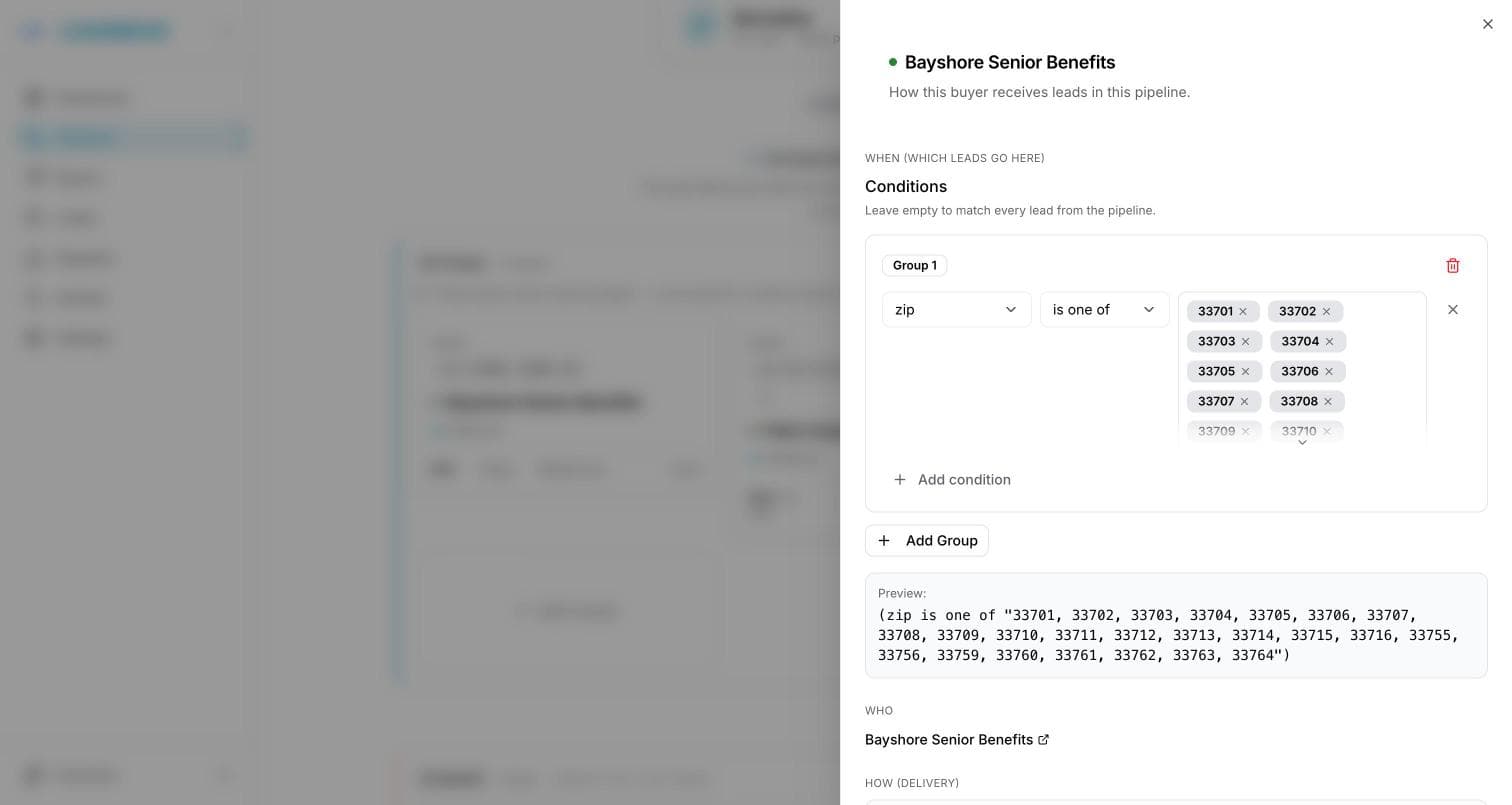
A pasted zip list
Choose the zip field, the operator is one of, and enter the zips. The rule matches any lead whose zip is on the list, and each zip is its own entry you can remove later without touching the rest.
Paste a column from a spreadsheet: LeadMove splits on commas, semicolons and line breaks, so 300 zips become 300 entries in one paste.
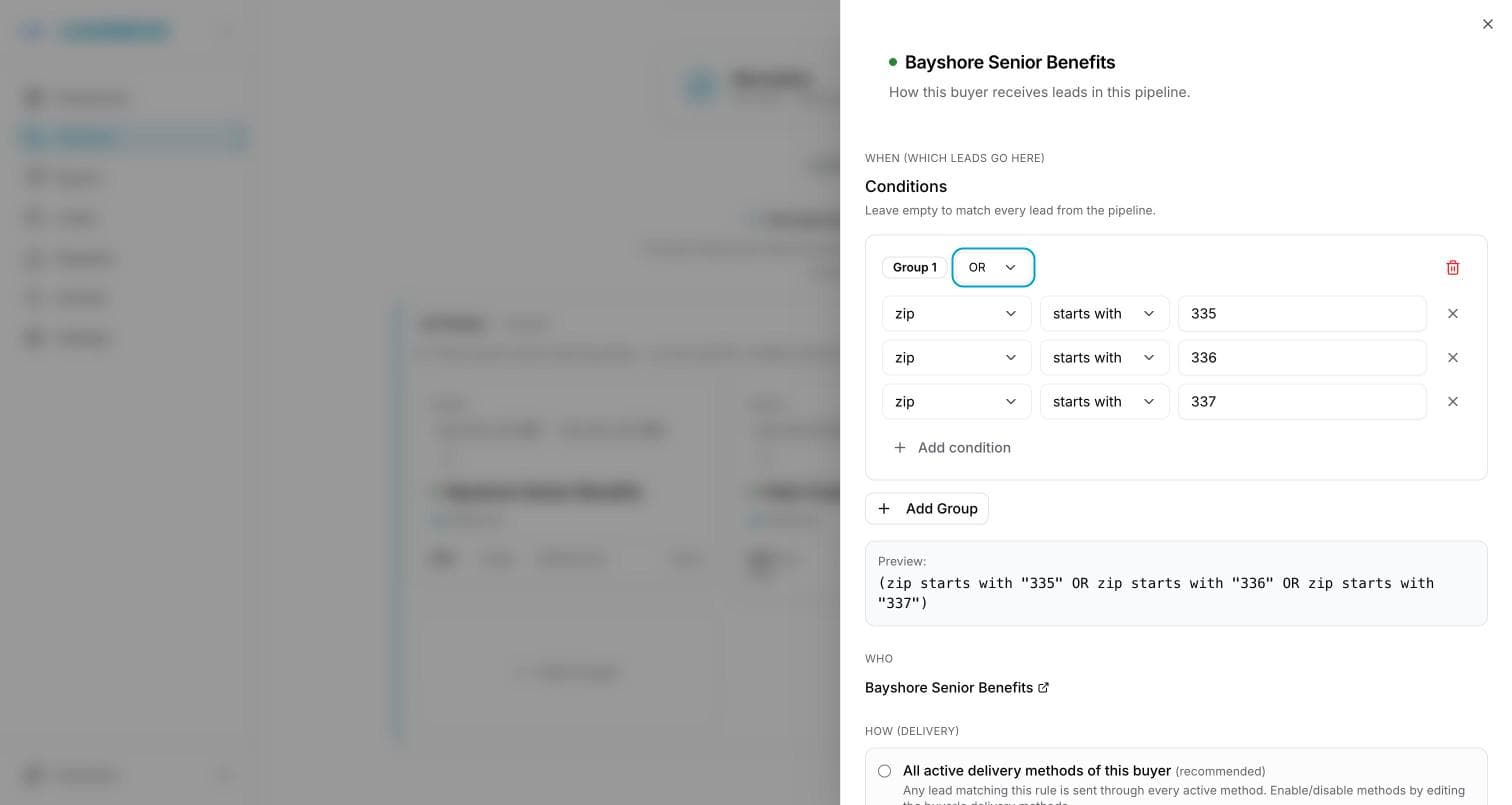
A zip prefix
Choose the zip field and the operator starts with. Every US zip shares its first three digits with its neighbors, so starts with 335 covers the Tampa Bay area in one condition. To cover a region made of several prefixes, put the conditions in one OR group: starts with 335 OR starts with 336 OR starts with 337.
The same operator works for a Canadian postal code: its first three characters are the forward sortation area.
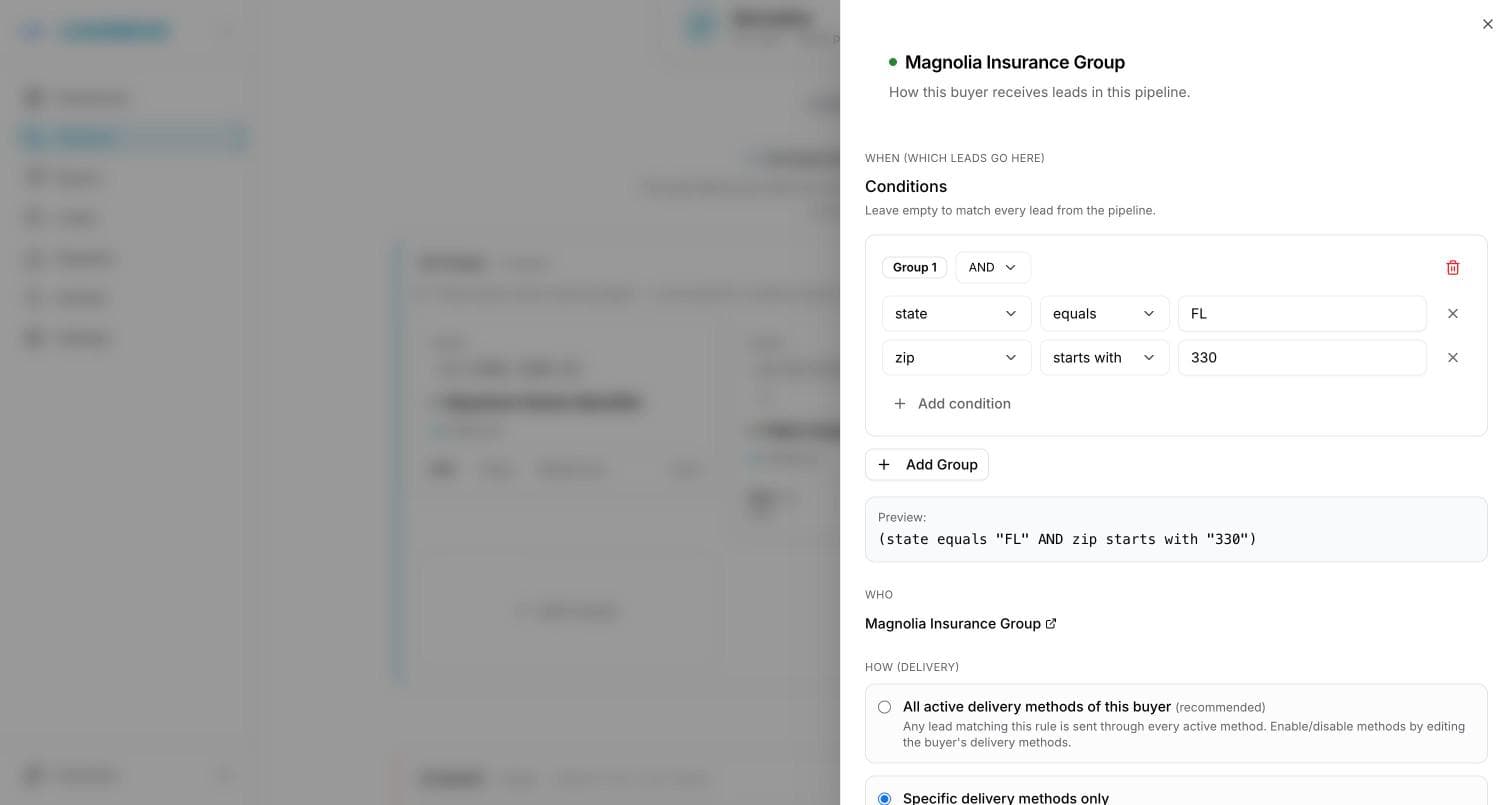
A state or city gate
Choose the state (or city) field and the operator equals, and put it in an AND group above the zip condition: state equals FL AND zip starts with 330. A lead with a mistyped zip then never crosses a state line, and a buyer licensed in one state only ever sees that state. A buyer who covers a whole state needs only the state condition.
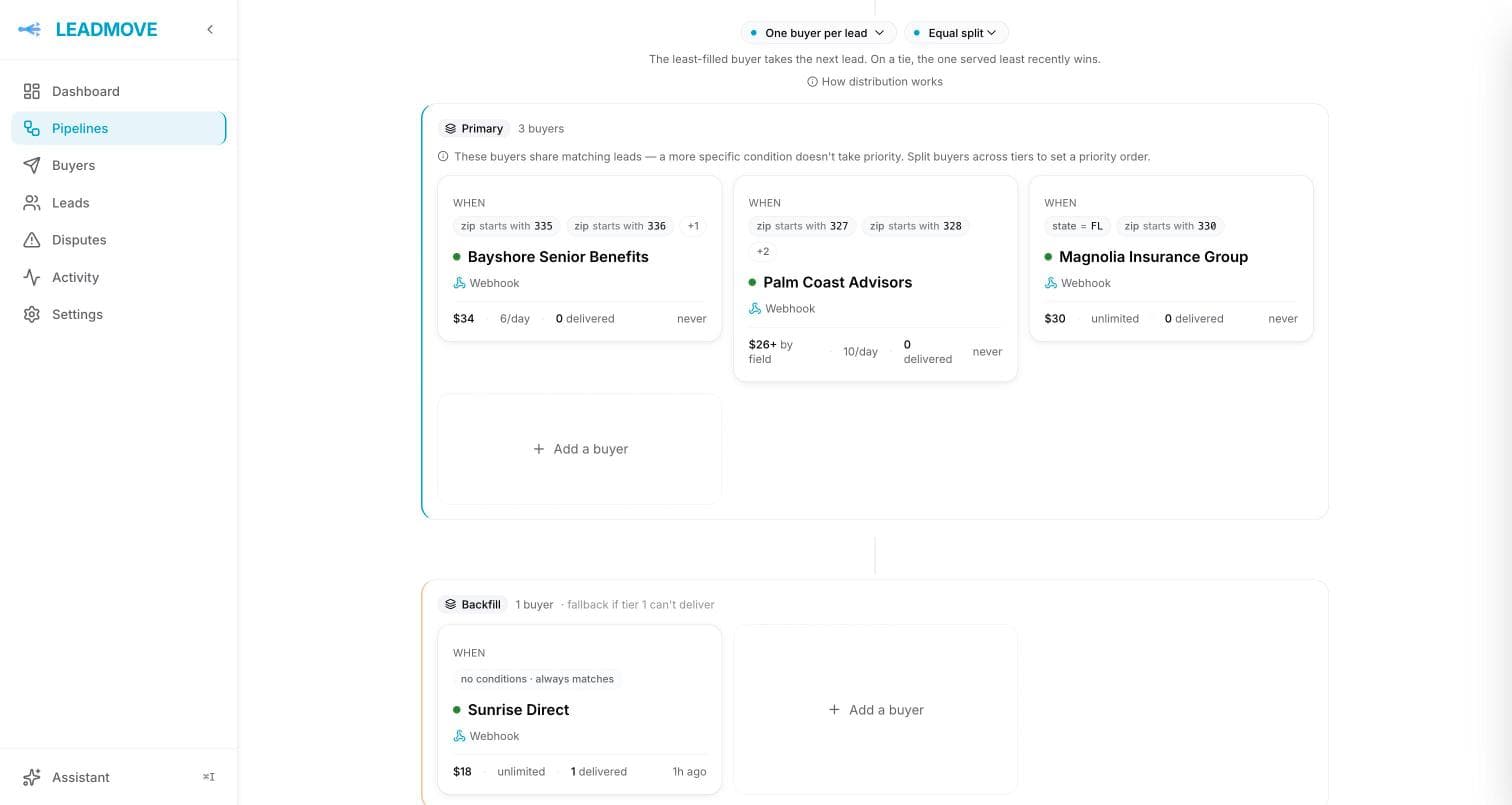
The example: Medicare Florida
One pipeline with a zip field, and four buyers:
| Buyer | Territory | Price | Daily cap | Role |
|---|---|---|---|---|
| Bayshore Senior Benefits | zip starts with 335, 336 or 337 | $34 | 6 | Primary |
| Palm Coast Advisors | zip starts with 327, 328, 329 or 347 | $38 for grade A, $26 otherwise | 10 | Primary |
| Magnolia Insurance Group | zip starts with 330, 331, 332 or 333 | $30 | none | Primary |
| Sunrise Direct | no conditions | $18 | none | Backfill |
The three territory buyers sit in the Primary tier; Sunrise Direct sits alone in the Backfill tier and takes whatever the others leave.
What happens when territories overlap
- Exclusive or shared is the pipeline's distribution mode: on One buyer per lead, a zip claimed by two buyers goes to one of them, chosen by tier, weight and caps; on All matching buyers, both receive it, each at their own price.
- Tiers decide who is asked first: a lead is offered to the Primary tier and falls through to the next one only when no territory matches or every matching buyer is full (Tiers and fallback).
- Caps and hours are checked on every lead: a buyer at its daily cap, or outside its operating hours and set to skip, is passed over and the next eligible buyer takes the lead (Tiers and fallback, Operating hours).
Cover the zips nobody owns
A buyer with no conditions matches every lead. Put one in a lower tier and it receives every lead the territory buyers did not take: a zip outside every territory, or a zip whose buyer is full for the day.
Without a backfill buyer, such a lead is marked unrouted and stays in your leads list. From the lead page you can Send to buyer by hand, or fix the territory (add the zip, raise a cap) and hit Re-run distribution.
Test it
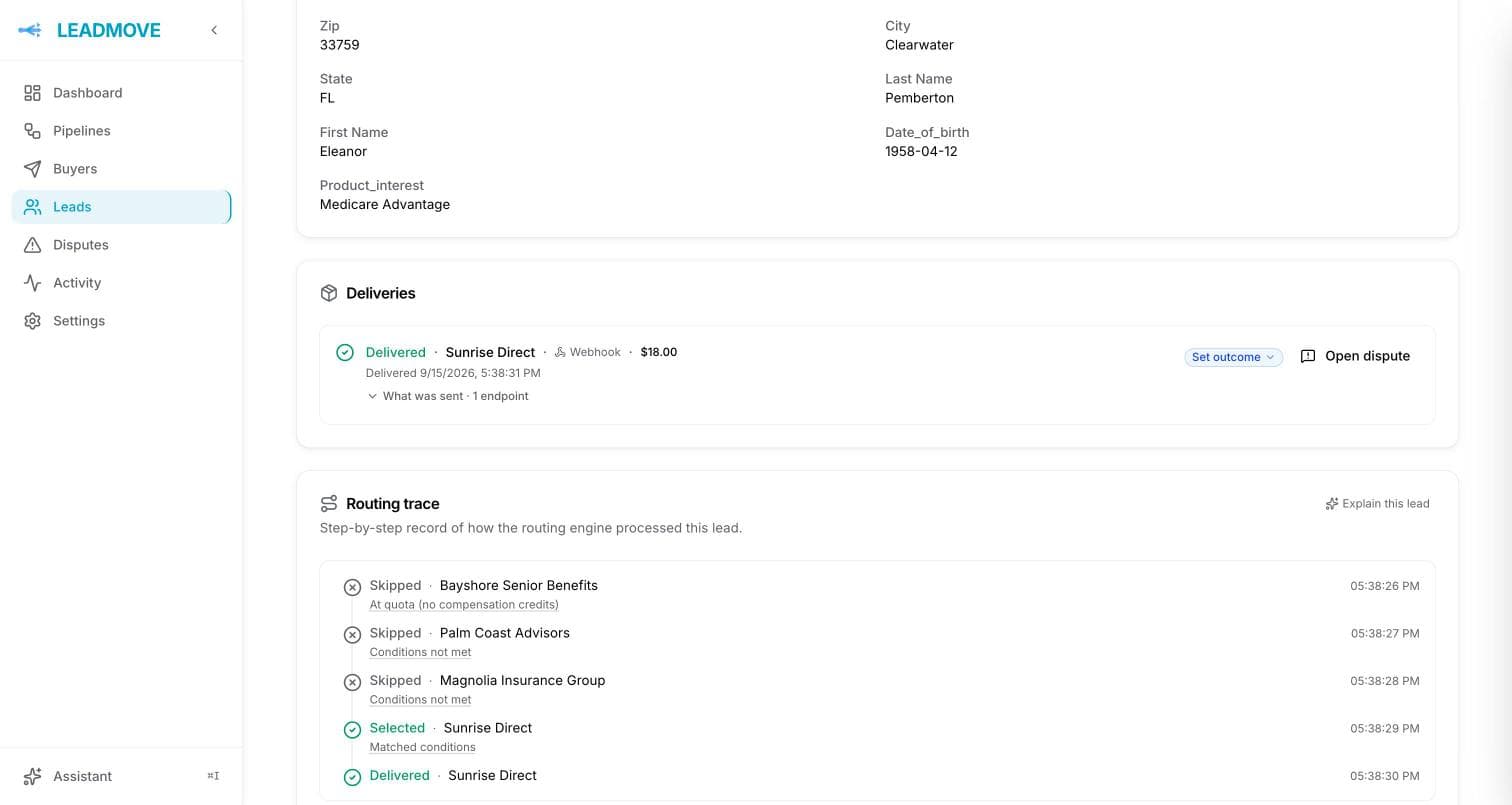
Open the pipeline and click Test a lead. Send one lead per territory (a 335xx zip, a 327xx zip, a 330xx zip, then a zip outside all three) and read the decision: which buyers matched on zip, which one was selected, and why the others were skipped. The same trace sits on every real lead's page. See Testing distribution.
Common questions
Can I paste a few hundred zips at once? Yes. Copy the column from your spreadsheet into an is one of condition. Values split on commas, semicolons and line breaks, and each one becomes an entry you can search, add to or remove later without repasting.
Can I route by radius, for example 25 miles around an office? Not as a radius setting. Use a zip prefix for an area, or a list drawn from a map for a shape. Most radius requests turn out to be a fixed set of zips that rarely changes, and a list is one paste away.
Do zips starting with 0 work?
Yes. LeadMove matches numbers and text the same way, so 02134 and 2134 are two different values only if they arrive as two different values. Make sure your source sends the zip as text: a spreadsheet exported as numbers drops the leading zero before the lead ever reaches LeadMove.
Is a county a territory? A county is a list of zips. Paste the list into an is one of condition and it behaves like any other territory.