Operating hours
Restrict a buyer's deliveries to the days and times it can work leads, and choose what happens the rest of the time.
Buyer → Settings → Operating hours → Edit. Turn the switch on to set one window per day, plus what happens to leads arriving while it's closed. Leave the switch off and the buyer receives leads 24/7.
Hours run on the buyer's timezone, set once under Settings → Profile — the same clock quota windows use, whether or not operating hours are on. The panel shows you which one is in force.
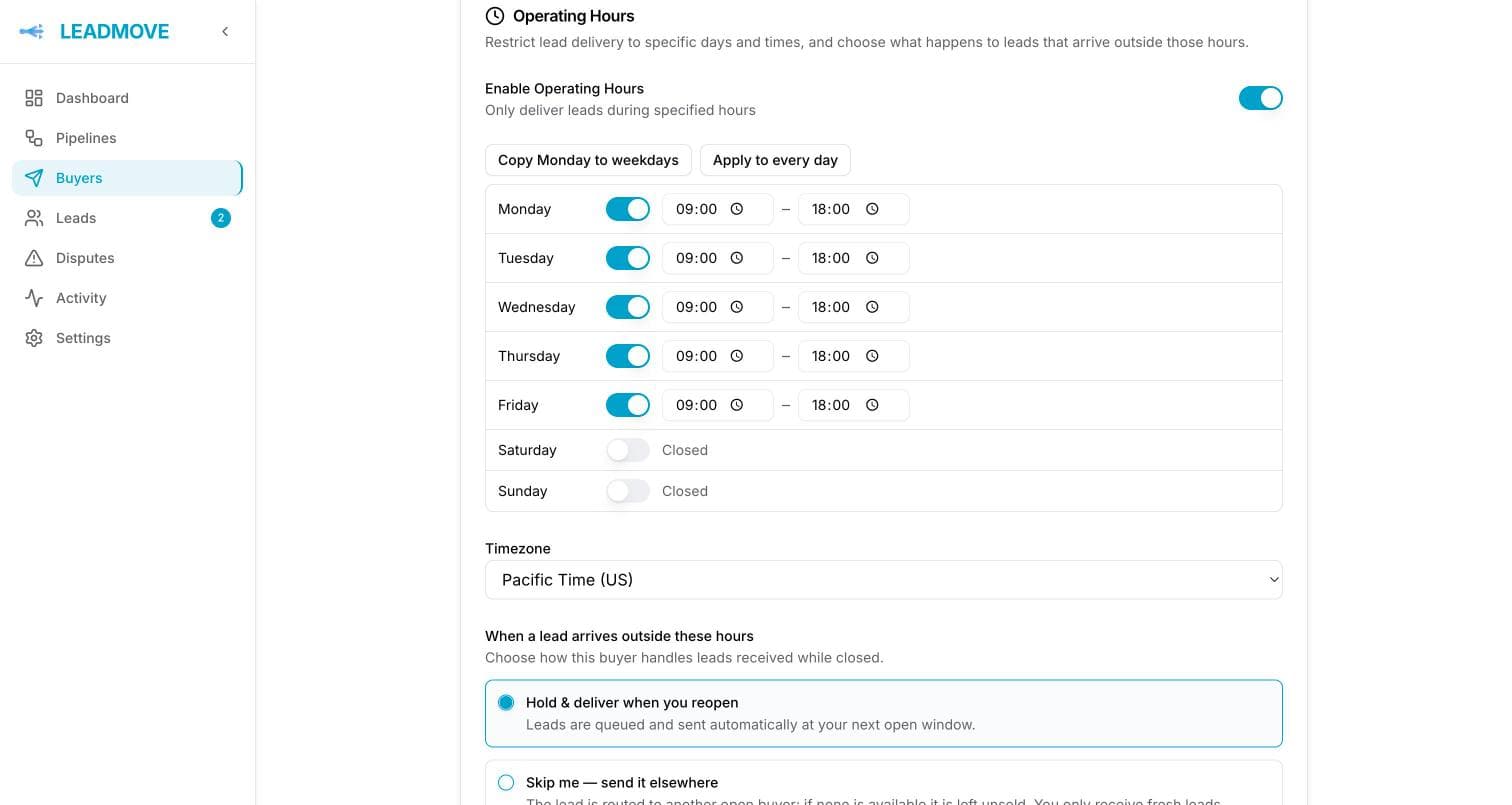
The weekly grid
Each day is open with a start and end time, or closed. Copy Monday to weekdays and Apply to every day save you filling seven rows. Overnight windows work: 22:00 – 06:00 runs past midnight into the next morning.
An overnight window belongs to the day it starts. Monday 22:00 – 06:00 keeps the buyer open until Tuesday 06:00 — even if Tuesday itself is closed.
The buyer's timezone applies to the whole grid, and daylight saving follows automatically. A preview line under the grid summarizes what you just built.
Every day closed means nothing is delivered
The preview says so out loud. Turn Operating hours off instead of closing all seven days.
When a lead arrives outside these hours
| Choice | What happens |
|---|---|
| Skip me — send it elsewhere (default) | The buyer isn't considered at all. The lead goes to another open buyer, and is left unrouted if there isn't one. The buyer only ever gets fresh leads. |
| Hold & deliver when you reopen | The lead is assigned to the buyer and queued. It's sent automatically at the buyer's next open window. |
A held lead shows a Deferred badge and its delivery sits in deferred until the window opens — nothing is lost, nothing needs your attention. See Lead statuses explained.
Held leads count against the buyer's caps as soon as they're assigned. A buyer whose overnight queue fills its daily cap is skipped like any full buyer, so it never wakes up to more leads than it agreed to take.
Closing for a day or a week
Operating hours describe a normal week. For a holiday or a week off, don't edit the grid — use Temporarily close… in the buyer's status control, which takes an end date and expires on its own. See Temporarily closing a buyer.
The two compose. The closure decides until when, the hours decide at what time: a closure ending Monday at midnight delivers at Monday's opening time.
The choice above does not carry over, though — it is asked again when you close. Holding leads until 9 AM is one thing; holding a week of them is another, and the closure dialog defaults to sending them elsewhere.
Open buyers always win first
A closed buyer set to hold is a last resort, not a queue-jumper. Distribution walks your tiers looking for an open buyer first — including buyers in lower tiers. Only when no open buyer anywhere can take the lead does it go to the closed buyer that reopens soonest.
So a closed tier-1 buyer doesn't block an open tier-2 buyer. Your inventory keeps moving.
Common questions
Should I use skip or hold? Skip (the default) when the buyer only buys leads it can call within minutes — stale leads are worse than no leads for them. Hold when the buyer wants the volume and can work a lead the next morning.
I approved a held lead during manual review, but the buyer got nothing. Approving releases the lead into distribution; it still respects the buyer's hours. It will be delivered at the next open window.
Which clock is used, mine or the buyer's? The buyer's. Set it under Settings → Profile → Edit → Timezone, to where the buyer's team actually sits.
A lead came in one minute before closing. What happens? It's delivered right away. The check runs at delivery time against the buyer's current local time.
Can I set different hours per pipeline? No. Operating hours belong to the buyer and apply everywhere it receives leads.