Billing modes
Invoice a buyer on your own terms, or run it on a prepaid balance that each delivered lead debits.
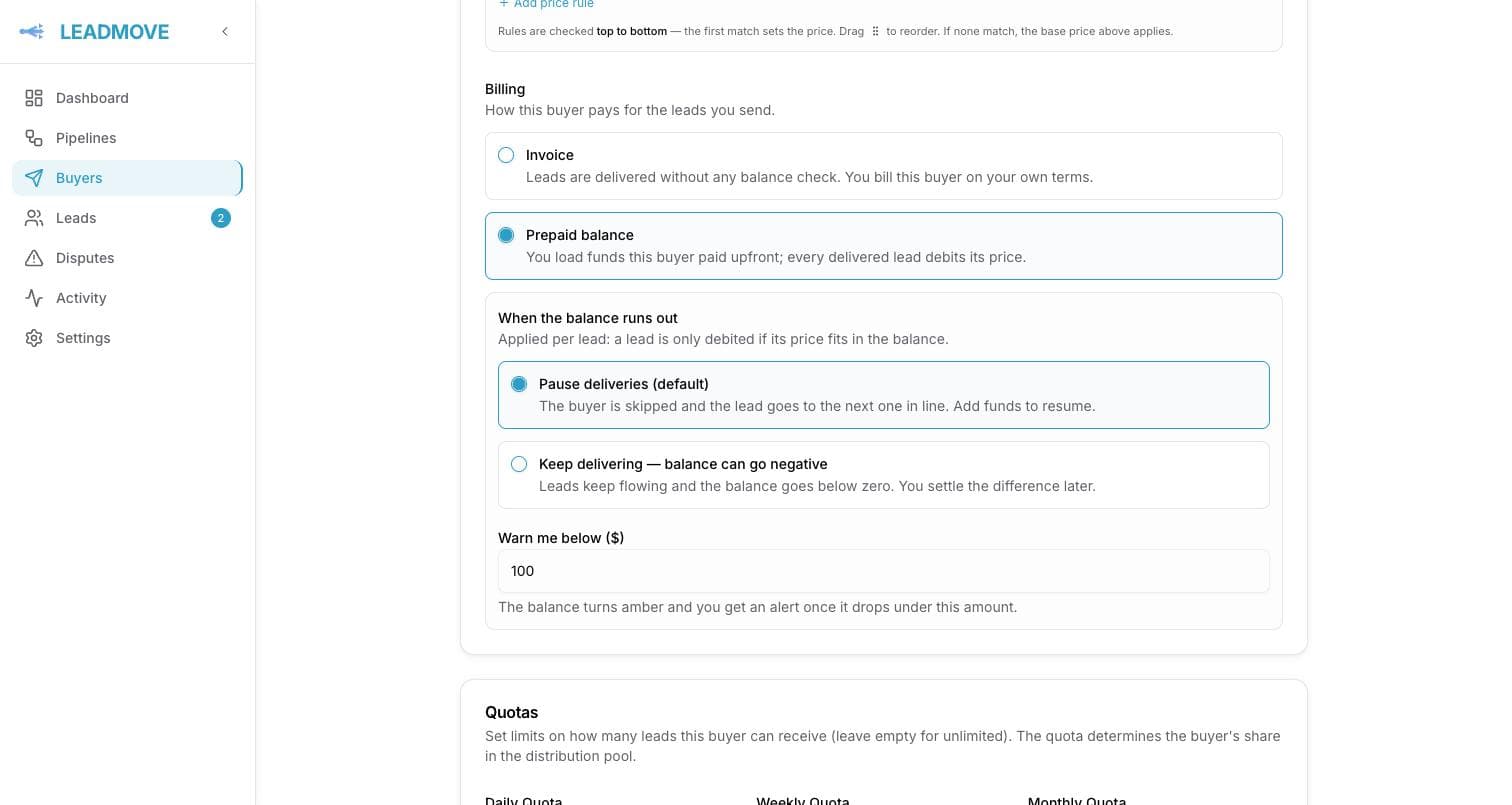
Buyer → Settings → Pricing & billing → Edit. Two modes:
| Mode | What happens |
|---|---|
| Invoice (default) | Leads are delivered with no balance check. You bill the buyer however you already do. Nothing else changes. |
| Prepaid balance | You load the funds the buyer paid you upfront, and every lead sent to it debits that lead's price. |
Either mode can also bill after validation: a delivered lead bills only once you validate it.
Switching to prepaid adds a Balance card on the buyer page and a balance history behind it. Nothing about prepaid is visible to the buyer — the buyer portal shows no money at all.
Adding funds
Add funds on the balance card records money you already collected — a wire, a card payment, whatever happened outside LeadMove. Amount plus an optional note ("Wire received 12 Mar, invoice #1042"). LeadMove doesn't collect the money; it tracks it.
Record adjustment, on the balance page, corrects the balance without recording a payment. A negative amount takes funds back.
Recording a payment from Claude
A connected assistant with the Record buyer payments permission can do both from a sentence: "Acme paid invoice 4521, 600 dollars."
It shows you the balance before and after, how many leads that buys at the buyer's current price, and — when the buyer is stopped for an empty balance — that their deliveries resume the moment you approve. Nothing moves until you say yes.
Two differences from the button:
- A reference is required, not optional: the invoice number or transfer id. The same reference is recorded once per buyer, so a workflow that runs twice adds the money once and tells you about the entry it already made.
- Per-connection limits apply on top of LeadMove's own: $5,000 per entry and $10,000 a day by default, which you can lower on the connection's page.
Every owner is emailed when a payment or an adjustment lands. Undoing one within 7 days writes an opposite entry rather than erasing it — and is refused if the money has since been spent and the reversal would take the balance below zero.
Switching a buyer between invoice and prepaid is its own request for the same reason it has its own screen: it changes what stops that buyer's deliveries, so it is previewed on its own and the owners hear about it.
The history
Every movement is a row, newest first, with the running balance after it:
| Type | Meaning |
|---|---|
| Top-up | Funds you added. |
| Lead | A lead debited its price. Links to the lead. |
| Refund | The buyer never got the lead, so the money came back: you canceled the delivery while it was queued, or it failed its last automatic retry. Happens once, automatically. |
| Adjustment | A manual correction you made. |
When the balance runs out
The check is per lead: a lead is only debited if its price fits in what's left.
| Setting | What happens |
|---|---|
| Pause deliveries (default) | The buyer is skipped and the lead goes to the next buyer in line. Add funds to resume — on a pipeline with Retry when capacity returns on, the leads that were waiting on this buyer are retried the moment you top up. |
| Keep delivering | Leads keep flowing and the balance goes below zero. You settle the difference later. |
Set Warn me below to get an alert (bell and email) the moment a debit takes the balance under that amount — once per top-up cycle, not on every lead. The balance turns amber, then red when it's empty.
No price means no debit
A prepaid buyer with no price set debits $0 on every lead and its balance never moves. Set a price per lead on the buyer, or price it on each pipeline's routing rule — see Lead pricing.
Common questions
Does the buyer see its balance? No. The portal shows leads, statuses and disputes only — no prices, no balance, no invoices.
A delivery to a prepaid buyer failed for good. Is the buyer still charged? No. Once a delivery has used its three attempts it is permanently failed, and the price is credited straight back to the balance — you'll see it as a Refund row in the history. That delivery can't be retried afterwards; to give the lead another chance, assign it manually to a buyer.
A prepaid buyer stopped receiving leads. Where did they go? To the next eligible buyer. The lead page's routing trace shows the skip with both figures: what's left and what the lead cost.
Does an accepted dispute refund the balance? No. Accepting a dispute grants the buyer a replacement lead credit, delivered free on top of its quota. See How disputes work.
Can I switch a buyer back to invoice? Yes, at any time. The balance and its history are kept and simply stop being used.
Frequently asked questions
Does LeadMove invoice my buyers for me?
No. In the default Invoice mode, leads are delivered with no balance check and you bill the buyer however you already do; nothing else changes. LeadMove tracks what each delivered lead was priced at, it never collects the money.
Can a buyer prepay for leads?
Yes. Switch the buyer to Prepaid balance, record the funds it paid you, and every delivered lead debits its price from the balance, with a full history. When the balance runs out the buyer is skipped by default, or you can let it go negative and settle later.
Is a buyer charged for a lead that was never delivered?
No. If a delivery to a prepaid buyer is canceled while queued or fails its last automatic retry, the price is refunded to the balance automatically and appears as a Refund row. Billing follows delivered leads only.
Operating hours
Restrict a buyer's deliveries to the days and times it can work leads, and choose what happens the rest of the time.
Bill a lead only after the buyer validates it
Off by default. When a buyer only pays for the leads it accepts, delivered leads wait for your decision and bill once validated.