Lead pricing
How LeadMove decides what a buyer pays for a delivered lead, and how to price by grade or by any other field.
A lead's price is resolved per delivery, at the moment the buyer is selected, by walking four places in order and taking the first one that has a value:
| # | Where | Wins when |
|---|---|---|
| 1 | The routing rule's price rules | A rule's conditions match the lead |
| 2 | The routing rule's flat price | Set on the rule |
| 3 | The buyer's price rules | A rule's conditions match the lead |
| 4 | The buyer's default price | Set on the buyer |
Nothing set anywhere → $0. A price of 0 is a real value, not "unset": set it deliberately to give a buyer free leads on a rule.
The routing rule fully overrides the buyer
If the routing rule produces any price at all — a matching price rule or a flat price — the buyer's own pricing is never consulted. Set a price on the rule only when this pipeline should pay differently from the buyer's standard rate.
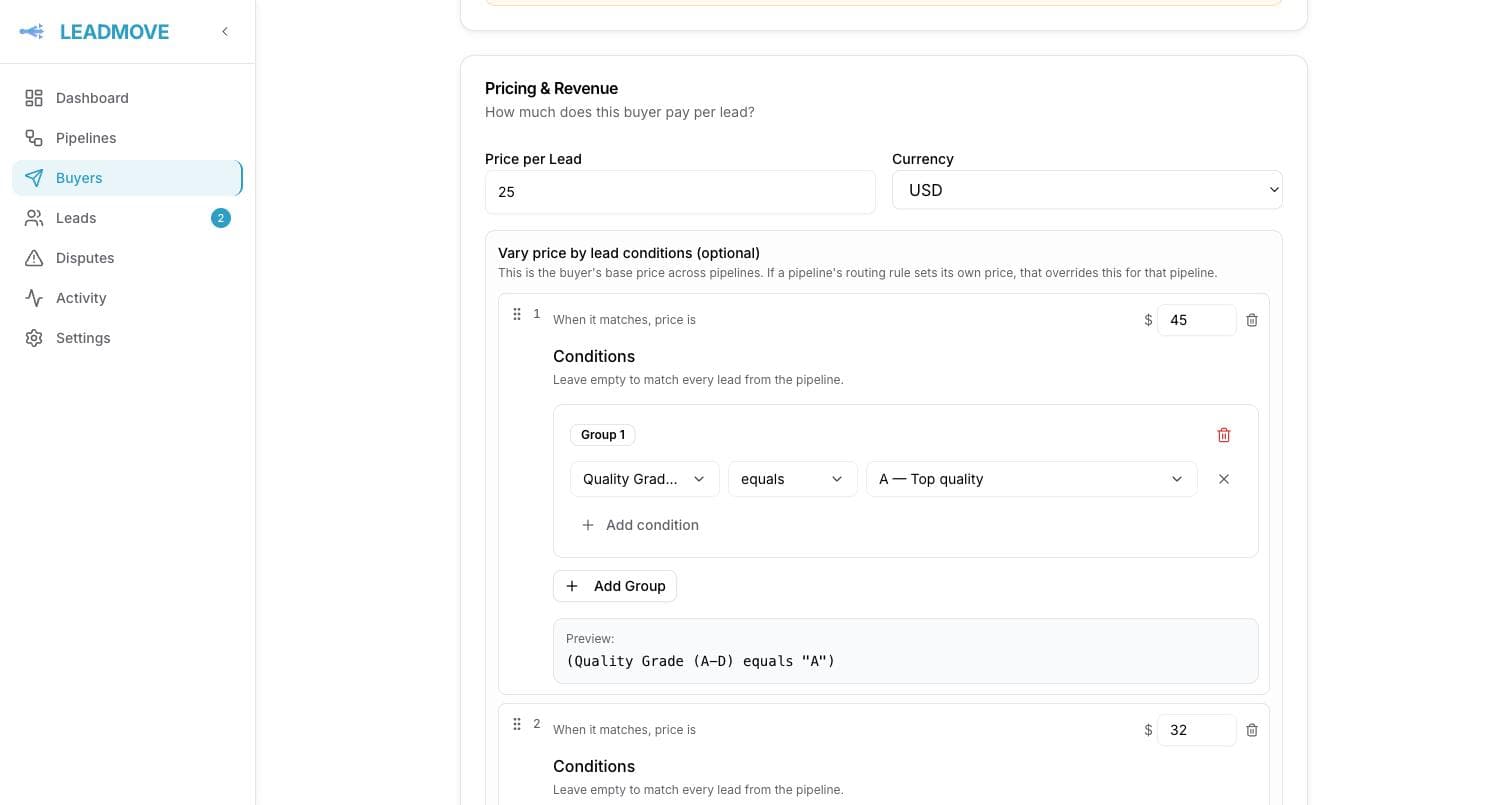
Conditional price rules
A price rule is a price plus a set of conditions, written with the same builder as routing conditions — your pipeline's fields, plus qualityScore and qualityGrade.
They're evaluated top to bottom, first match wins. Grade-based pricing is the common case:
| Order | Conditions | Price |
|---|---|---|
| 1 | qualityGrade is one of A, B | $42 |
| 2 | qualityGrade equals C | $28 |
| fallback | (the base / default price) | $15 |
A price rule requires at least one condition
A rule with no conditions is refused when you save, and ignored if an old one is still stored: the catch-all is the base price (the buyer's default price, or the rule's flat price), never a bare price rule.
Prices are capped: any price you set must be between $0 and $50,000, with at most two decimals. 0 is allowed and means free.
Where the price is visible
- Buyer panel on the pipeline canvas — the price you configured. A buyer with price rules shows its cheapest as "$15+".
- Delivery history on a lead — the amount that delivery was actually billed at, per buyer.
The resolved amount is frozen onto the delivery when the buyer is selected. Changing a price later affects new leads only; past deliveries keep the amount they were sold at.
Common questions
Two of my price rules match the same lead. Which applies? The first one in the list. Reorder them so the most specific sits above the more general.
Is a replacement lead billed? No. A lead delivered against a make-good credit is priced at $0, whatever the rules say.
Does a lead cost the same to two buyers in shared mode? Not necessarily. Each buyer's delivery is priced independently through its own rule, so the same lead can be $40 to one buyer and $12 to another.
I changed a price and my revenue figures didn't move. Expected. Prices are snapshotted at selection, so historical deliveries never re-price.
Where does the price come from for a lead I assigned by hand? The buyer's own pricing — its price rules first, then its default price, then $0. There's no routing rule involved in a manual assignment.
Frequently asked questions
Can the same lead cost a different price for different buyers?
Yes. Each buyer's delivery is priced independently through its own routing rule, so in a shared pipeline the same lead can be $40 to one buyer and $12 to another. A rule's price fully overrides the buyer's default when set.
Can I charge more for better leads?
Yes, with conditional price rules: a price plus conditions on any pipeline field, the quality score or the grade, evaluated top to bottom, first match wins. Grade A and B at $42, grade C at $28, everything else at the base price is the common setup.
If I change a price, do past deliveries change?
No. The resolved amount is frozen onto the delivery when the buyer is selected, so historical deliveries and revenue figures never re-price. A new price applies to leads routed from then on.
Routing by territory (zip, state, city)
How to give each buyer a territory with a pasted zip list, a zip prefix or a state, what happens when territories overlap, and how to cover the zips nobody owns.
Testing your distribution
Simulate a lead to see which buyers match and why, preview what each one would receive, and check a buyer's endpoint is reachable.