Testing your distribution
Simulate a lead to see which buyers match and why, preview what each one would receive, and check a buyer's endpoint is reachable.
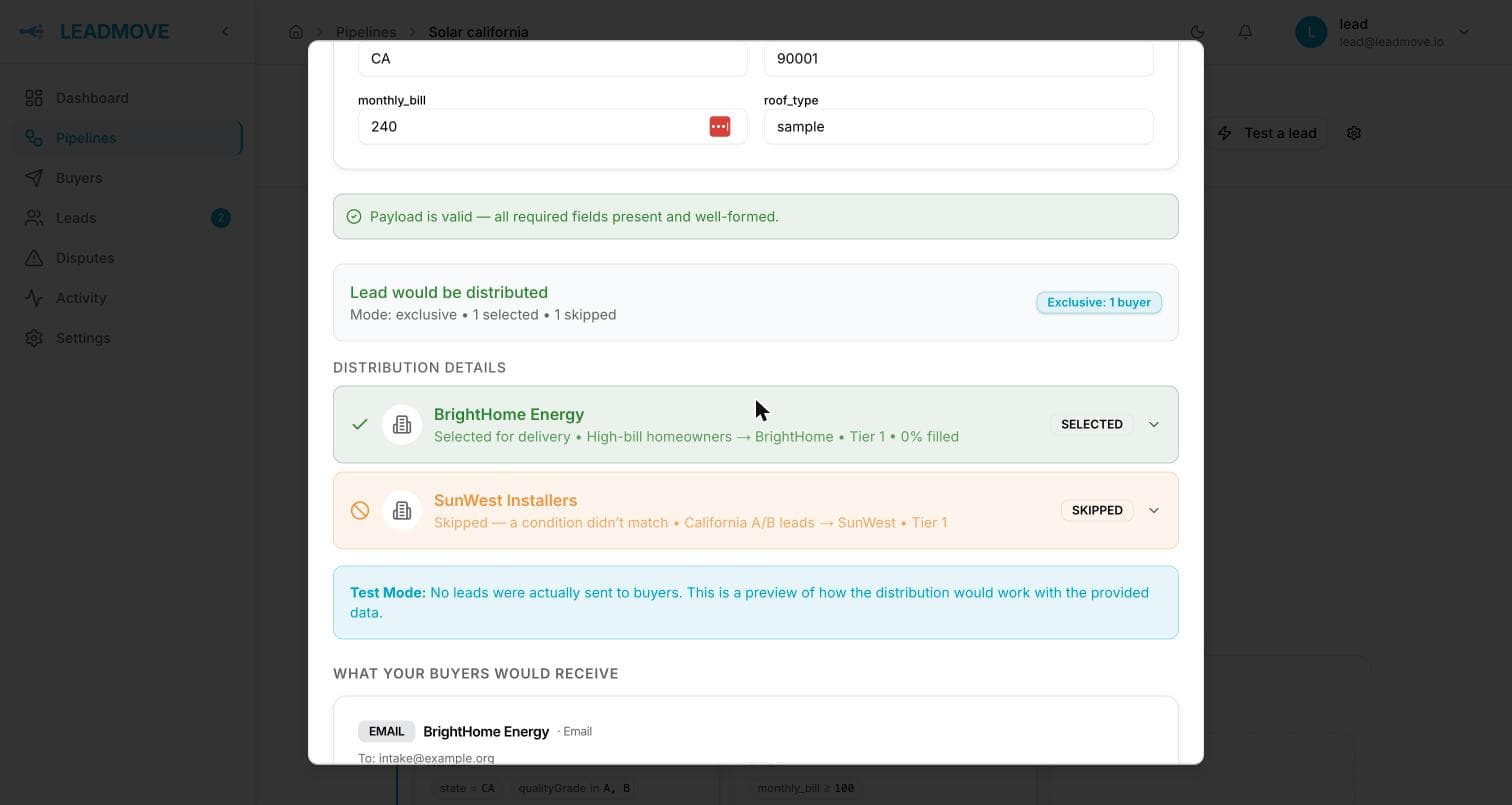
Open a pipeline and click Test a lead. Fill in sample values and run it: you get the full routing decision without touching your data — which buyers were selected, which were skipped, and the condition-by-condition reason for each.
What the test console shows
- Validation — the sample is checked exactly like a real post. If it would be rejected (missing required field, malformed email), you get that error and no routing result: a lead that never gets accepted never reaches distribution.
- Before routing — anything that would stop a real lead ahead of your buyers: caught by the spam filter, a duplicate of a lead already in the pipeline, held for review, or forwarded to another pipeline. This section only appears when one of them applies.
- Selected buyers — with the rule name and tier that put the lead there, and the price that buyer would pay for it.
- Skipped buyers — with the reason: conditions not met, at quota, already received this contact, prepaid balance too low.
- Why, per condition — expected value vs the value your sample carried, pass or fail.
- Delivery preview — what each selected buyer would receive in its own format: email body, webhook JSON, sheet row, SMS text. You can mail that preview to yourself; it's marked as a test and never goes to a buyer.
The decision itself is real: your buyers' current quotas, operating hours, prepaid balances and duplicate windows are all evaluated, so a buyer that's genuinely full shows up as at quota.
Checking your pricing
Each selected buyer shows the amount it would be billed for this exact lead, and where that amount came from — a conditional price on the rule, the rule's flat price, a conditional price on the buyer, or the buyer's default. The total for the lead sits at the top of the result, which is the sum across buyers when a lead is shared.
Change a value in the sample and run it again to see a conditional price switch rungs. This is the fastest way to confirm a price rule fires on the leads you meant it to.
Simulating from Claude
With Act on leads granted, ask the question instead of filling the form: would a Fresno solar lead with a $400 bill reach Acme? You get the same three layers — whether intake would accept it, which buyer wins and why the others lost, and what that buyer would be billed.
Give it values that are made up. A sample carrying the email or phone of a lead already in your account is refused: a test lead built from a real customer is that customer's details, pasted somewhere they do not belong. Made-up values with the right shape — a real-looking zip, a valid-format phone — test exactly the same rules.
Nothing is delivered, nothing is stored and no quota moves, the same as in the app.
Testing a posting source
Posting source, above the sample fields, decides which of the pipeline's posting URLs the lead pretends to have arrived on. Pick one to test a rule conditioned on Source; leave it on No specific source and those rules won't match, the same as for a lead added by hand.
Testing scores and grades
Scoring runs after a lead is ingested, so a test lead has no score of its own. Set the Quality score and Quality grade fields on the sample to simulate one: conditions and price rules that key on qualityScore / qualityGrade then evaluate against the values you chose.
Leave them empty and those conditions simply won't match — if your pipeline depends on them, the console says so after the run.
What a test lead does not do
Nothing about a test lead is recorded
It is not kept in your leads list, it never becomes a duplicate for later real leads, it does not count toward your plan's monthly lead quota, it does not consume any buyer's quota or prepaid balance, it creates no deliveries and is never billed. Run it as often as you like while tuning conditions.
The console does check your deduplication window — it tells you when a real lead carrying these values would be rejected as a duplicate — but the test lead itself is never stored, so running it twice never flags the second run.
Test leads are not scored for you
No quality score or grade is produced automatically — set them yourself on the sample to test rules and prices that depend on them.
Testing one buyer's endpoint
The test console proves your routing is right. To prove a buyer's connection works, use Test delivery on the rule: it builds a sample payload from that buyer's schema and field mapping and pushes it through the endpoint the rule would really use.
Test delivery reaches the real endpoint
The webhook is really sent, the email really sent to the buyer's address, the SMS really texted — flagged as a test, but the buyer sees it. Warn them first, or point the endpoint at a URL of your own. Google Sheets is the exception: dry run, no row written.
A webhook with a body template gets the sample in that exact format, fixed values included, like a real lead. It carries no test flag, so the buyer's system treats it as a real submission unless you send it to their test URL.
Common questions
Which do I use, "Test lead" or "Test delivery"? Test lead when you're asking who should get this? Test delivery when you're asking does this buyer's endpoint actually work?
The test says a buyer matches, but real leads aren't reaching it. Compare with a real lead's routing trace on the lead page. The usual causes change between runs: the buyer filled its quota, closed for the day, ran out of prepaid balance, or already had that contact.
Can I test a paused buyer? No. A paused rule is excluded from distribution entirely, so it won't appear in the results. Activate it, test, pause it again.
Should I use real customer data? No need, and don't. Type plausible fake values of the right shape — a real-looking email and phone are enough for validation to behave the same way.