Routing rules
What a routing rule holds — conditions, price, delivery targets, field mapping, tier and weight — and how to edit it.
A routing rule is one buyer inside one pipeline. It answers three questions: when does this buyer get a lead (conditions), how does it receive it (delivery targets and field mapping), and what does it pay (price). Adding a buyer to a pipeline creates a rule; removing it deletes the rule only — the buyer record and its past leads stay.
Click a buyer on the pipeline canvas to open its panel. Nothing is saved until you press Save changes, and leaving a panel with edits in it asks before discarding them — the same everywhere in the app.
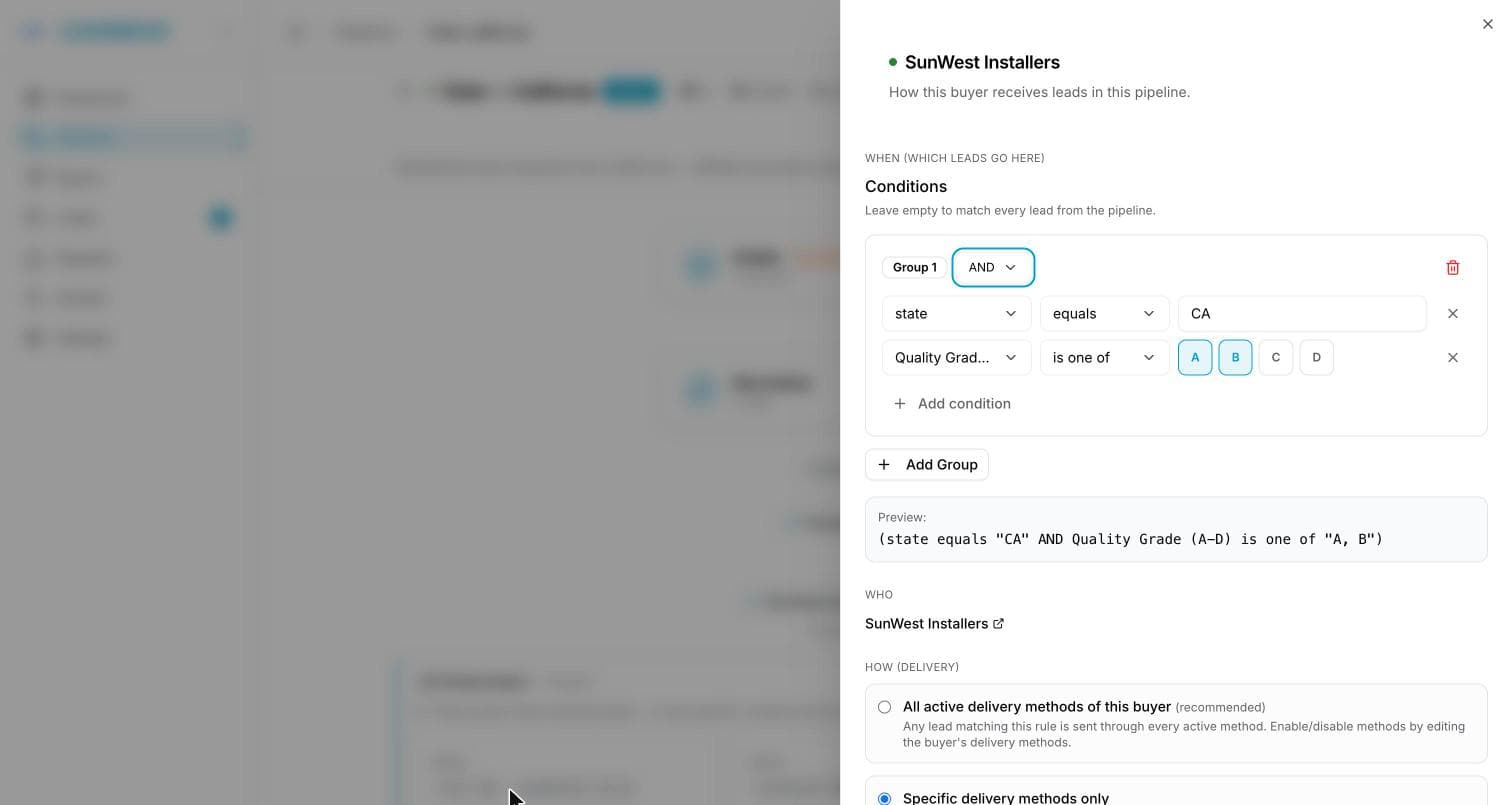
When — conditions
Conditions are built over the fields your pipeline collects, plus system fields available in every pipeline:
| Field | Type | Values |
|---|---|---|
Source | choice | one of the pipeline's posting sources |
qualityScore | number | 0-100 |
qualityGrade | text | A, B, C, D |
| Attribution · Platform | choice | Facebook, Instagram |
| Attribution · Organic lead | choice | Yes, No |
| Attribution · Campaign, Ad set, Ad, Form (name or ID) | text | what the ad platform sent |
Source is where the lead was posted — the posting URL it came in through. Pick from the list; there's nothing to type. Rename a source later and every rule follows, because the rule points at the source itself, not at its name. It's the field to use when the vendor is the commercial criterion: two suppliers on one pipeline, different buyers or different prices for each.
Operators depend on the field type:
| Field type | Operators |
|---|---|
| Text | equals, not equals, contains, does not contain, starts with, ends with, is one of, is not one of, is set / is not set |
| Number | equals, not equals, greater than, greater than or equal, less than, less than or equal, is one of, is not one of, is set / is not set |
| Choice | equals, not equals, is one of, is not one of, is set / is not set |
Leads with no posting source
Leads added by CSV, by hand or forwarded from another pipeline have no posting source: they never match "Source is …", and always match "Source is not …".
Attribution fields sit in their own group at the bottom of the field list. They are filled for leads from a connected ad platform (Meta Lead Ads) and empty for every other lead, so there is no pipeline field to create: pick Attribution · Campaign, contains, Solar and the rule routes on the campaign name. A lead without attribution never matches a positive attribution condition. Price rules offer the same group.
From a buyer's page, Pricing offers the same Source field, with sources listed per pipeline (Meta Form A · Solar) — a buyer can hold rules on several pipelines, and two of them can name a source the same way.
Is set / is not set asks whether the lead carried the field at all, whatever its value — the way to route on "has a phone number" without caring which one.
For is one of, you can paste a whole column from a spreadsheet: values split on commas, semicolons and line breaks, and each one becomes an entry you can remove on its own. Territories built this way, and with starts with, are covered in Routing by territory.
Conditions sit in groups joined by AND or OR. A rule with no conditions matches every lead — that's what you want for a backfill buyer, and what you must avoid on a premium one. A half-filled condition can't be saved: leaving one blank used to make the rule match everything, which is rarely what anyone meant.
Numbers match whether they arrived as text or as numbers
3 and "3" are the same lead. A pipeline fed by a JSON webhook stores real numbers, one fed by a form or a CSV stores text, and the same rule now matches both — including in is one of lists, and for values that arrived formatted, like 50,000. Text comparisons stay case-sensitive for equals.
Using score or grade in a condition makes distribution wait for scoring to finish. See Using grades and scores.
How — delivery targets and field mapping
Delivery targets pick which of the buyer's endpoints this rule fires. Leave it untouched and the rule delivers to all of the buyer's active endpoints. Select a subset to send only to some of them.
Field mapping lines your pipeline's field names up with the field names the buyer's integration expects — zip on your side to postal_code on theirs. Only the fields defined in the buyer's delivery schema are ever sent: a schema field left unmapped goes out empty, and a pipeline field the schema doesn't list is never delivered, whatever it's named.
What — price
A flat price per lead, plus optional conditional price rules. Full resolution order in Lead pricing.
Priority and weight
Priority sits above Pricing: pick Primary, Fallback, another existing tier or a new fallback tier (Tiers and fallback). Weight is under Advanced — weight; it only has an effect when the pipeline is on Weighted distribution, and the panel shows the resulting share of the tier. The lowest weight is 1: to stop sending a buyer leads, pause the rule rather than reaching for a zero share.
Pause and activate
Pause in this pipeline stops the buyer receiving leads here without deleting anything — its conditions, price and mapping are kept. Activate in this pipeline turns it back on. A paused rule is invisible to distribution: it's not "skipped", it's not considered at all.
“Duplicated to this buyer — review before activating”
Duplicating a rule onto a different buyer copies the conditions, price and field mapping, and starts the copy paused with this amber banner. Those three things were written for the original buyer and may not fit the new one — the delivery targets are reset to the new buyer's defaults. Check them, then Save changes or Activate in this pipeline: either action clears the banner. Duplicating onto the same buyer doesn't raise it.
Creating rules from Claude
A connected assistant with the change configuration permission can write a rule from a sentence — send California solar leads to Acme at $25, tier 1 — and can switch rules on and off in bulk, or copy one onto another buyer or another pipeline.
Two things are worth knowing before you ask:
- A rule it creates arrives switched off, with the review banner above, so nothing is routed by it until you say so. Ask it to turn the rule on once you have read it.
- The preview replays the last 30 days of that pipeline's real leads through the rule: how many it would have matched, roughly what they would have cost, and whether the buyer's daily cap would have held. It counts the rule as if it were first in line, so treat the number as a ceiling — a rule in tier 2 only ever sees what tier 1 left behind.
It also warns about the mistakes that are invisible until they cost you: a rule with no conditions (it takes every lead), a buyer with no active endpoint, a price under that buyer's usual, and a tier with nothing above it.
Copying onto another pipeline lists any condition field the target pipeline does not collect. That is a warning, not a refusal — a field you are about to start collecting is a legitimate reason to write the rule first.
Common questions
Can I change a rule's buyer? Not directly. Duplicate the rule onto the other buyer — that reuses the conditions without rebuilding them — then remove the old one.
Why does my "premium" buyer receive everything? Its rule almost certainly has no conditions. An empty condition set matches every lead.
I removed a buyer from a pipeline. Did I lose its leads? No. Only the rule is deleted. The buyer, its endpoints and every lead already delivered to it are untouched.
Do I have to map every field? Only the ones the buyer's schema defines and you want filled. Mapping isn't a passthrough — a schema field with no mapping is sent empty, and a pipeline field the schema doesn't define never reaches the buyer.
Frequently asked questions
What can I route leads on?
Any field your pipeline collects, plus the posting source, the quality score, the quality grade and the lead's attribution (platform, organic, campaign, ad set, ad, form). Text fields offer equals, contains, starts with, is one of and more; numbers add greater than and less than; every field has is set and is not set. Conditions combine in AND and OR groups.
Can I paste a list of zip codes or values into a condition?
Yes. With is one of, paste a whole column from a spreadsheet: values split on commas, semicolons and line breaks, and each becomes its own entry you can remove individually. Starts with covers a zip prefix. Territories built this way are covered in Routing by territory.
Do I have to rebuild a rule when a second buyer wants the same leads?
No. Duplicate the rule onto the other buyer: conditions, price and field mapping are copied, and the copy starts paused with a banner asking you to review them for the new buyer. Delivery targets reset to that buyer's defaults. Activate it when it fits.