Meta (Facebook & Instagram) lead ads
Connect your Facebook account once, then link any instant form to a pipeline. Leads arrive within minutes, no Zapier needed.
LeadMove connects to Meta directly. Connect the Facebook account that manages your Pages once, then link any instant form to a pipeline from its Intake panel: every new lead on that form arrives within five minutes, already mapped, and is routed and delivered like any other lead.
There is no posting URL to copy and no Zapier or Make scenario to maintain. If you already run a bridge and want to keep it, it still works: see With a bridge.
Add a buyer first
A pipeline with no buyer accepts leads and leaves them unrouted: they arrive, they're stored, nobody receives them. Set up at least one buyer before you link a form, so your first real lead goes somewhere. See Adding buyers and the quickstart.
Connect Facebook
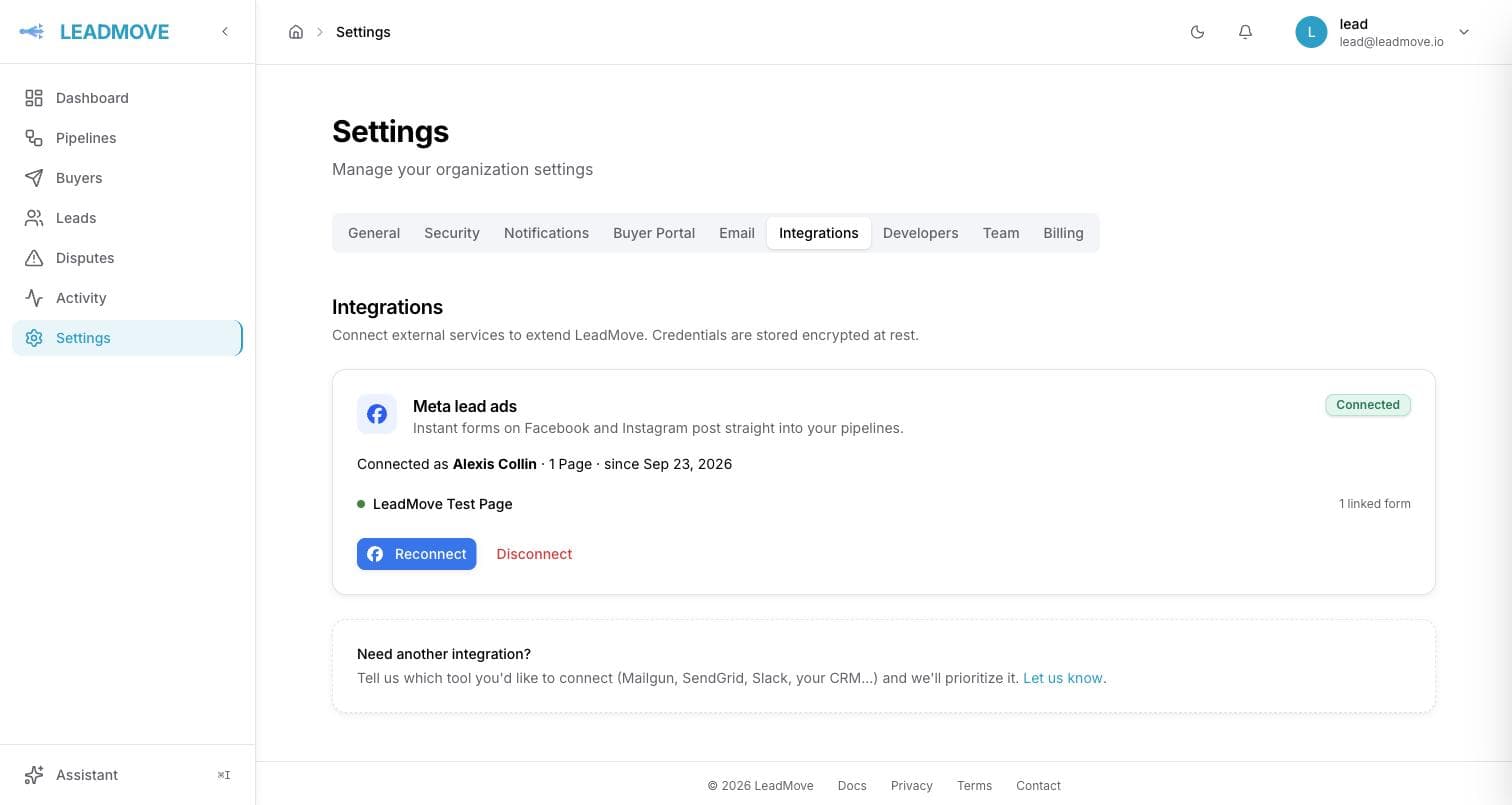
Go to Settings › Integrations and click Continue with Facebook on the Meta lead ads card. You can also start from a pipeline: Intake › Meta form asks you to connect, then brings you back to the same pipeline.
- Sign in with the account that administers your Pages, for good. The connection lives on that Facebook account. Pick one that has an admin role on the Pages and isn't going anywhere, rather than a freelancer's or a former employee's.
- Keep every permission ticked in Facebook's dialog. If one is missing, LeadMove refuses the connection and tells you to start again.
- Pages in a business portfolio: open Meta Business Suite › Settings › Integrations › Leads access and make sure LeadMove is allowed. If it isn't, Facebook refuses to hand over the leads and LeadMove flags the Page as Leads access blocked: see When access breaks.
Once connected, the card shows the account's name and its Pages, each with the number of forms linked to it. A workspace connects one Facebook account; to switch to another one, click Disconnect first.
Early access
While Meta reviews our app, each Facebook account is enabled by invitation. Write to hello@leadmove.io with the name of the account that manages your Pages; you'll get an invitation to accept on developers.facebook.com/requests, then connect as above.
No Page in the list?
Facebook only lists the Pages the signed-in account can manage, directly or through a business portfolio. If a Page is missing, open Meta Business Suite › Settings › People, give that account access to the Page with full control, then click Reconnect. If you connected before September 24, 2026 and a Page in a portfolio disappeared from the card, click Reconnect once: the dialog asks for one more permission, and the Page comes back.
Link a form
- Open the pipeline, click Intake, then Meta form next to Add a source.
- Choose the Page (it's preselected when you have only one), then the form. Each form shows its status, its lead count and its creation date. A form already linked elsewhere is greyed out and says where.
- Check the Source name (it defaults to the form's name) and click Link form.
The form becomes a source of the pipeline, and its editor opens. The field mapping is already filled in from the form's questions: email, phone_number, first_name and last_name land on your pipeline's fields, and so does any question whose key already matches one of them. Custom questions show as fields to map, like on any source. Campaign, ad set, ad and form details are not fields to map: they're recorded automatically as the lead's attribution.
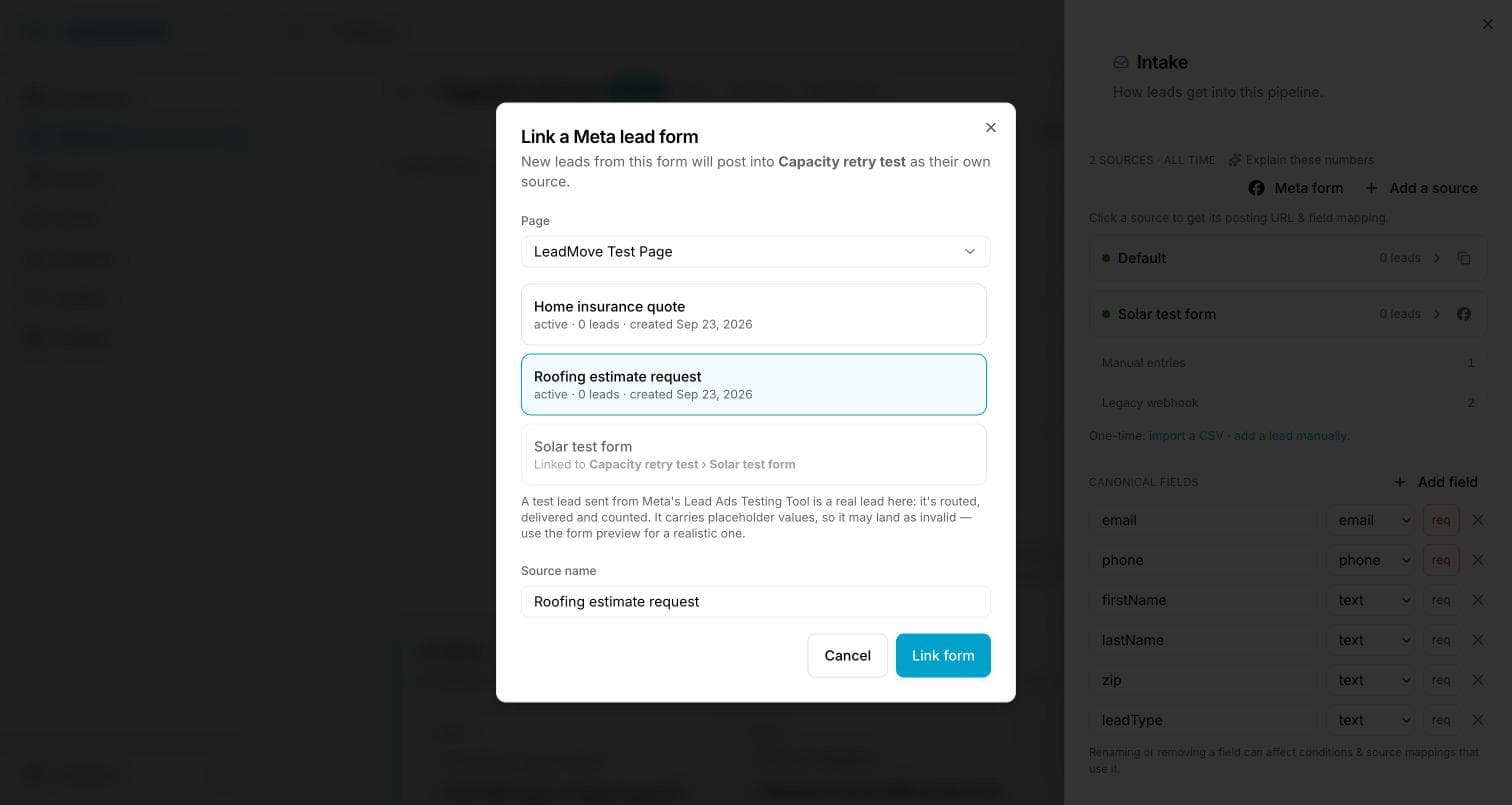
In the source list, a Meta source shows the Facebook icon where other sources have their copy-URL button, and last … ago once its first lead is in. Its editor shows the Page and the form, when it was linked, and whether Meta's webhook is active.
What linking changes, and what it doesn't:
- Only new leads arrive, from the moment you link. For the leads collected before, see Older leads.
- One form, one source. To send a form's leads to two pipelines, link it once and forward from there.
- Pause the source to stop its leads without unlinking; they're not stored while it's paused. Delete the source to unlink the form. The leads already received stay in the pipeline either way.
Fields you receive
Meta identifies each answer by its key. The standard ones:
| Meta key | Usually maps to |
|---|---|
full_name, or first_name + last_name | firstName / lastName |
email | email |
phone_number | phone |
city, state, zip_code | your location fields |
| Any custom question | whatever you named the field in your pipeline |
A question with several answers ticked arrives as one value, the answers separated by commas. Values arrive exactly as the person typed them: phone numbers with their country code (+13105551234), names with their capitals. Set the normalization once, on the pipeline: Data normalization.
Attribution
Every Meta lead records where it came from, automatically: there is nothing to map and no pipeline field to create. You use it by picking it under Attribution wherever LeadMove offers fields; your buyers get none of it unless you say so.
What is recorded, the same on every lead (empty when Meta has nothing, for example no campaign or ad on an organic lead):
- Platform: Facebook or Instagram
- Organic lead: yes when the form was reached without an ad
- Campaign, Ad set, Ad, Form: name and ID of each
- Ad platform lead ID: Meta's id for the lead, to find it in the Leads Center
- Submitted at: when the person submitted the form
On the lead, it sits in a collapsed Attribution · Meta block, apart from the answers. IDs have a copy button.
To route on it, open a rule's conditions and pick a field under Attribution: Attribution · Campaign contains Solar CA, or Attribution · Platform is Instagram. A lead without attribution never matches such a condition. To route by form, the Source condition works too: each linked form is its own source. See Routing rules.
To send it to a buyer, three ways, all off until you choose them:
- Include attribution, a switch under Standard payload on the buyer's webhook method, and on email or Google Sheets methods, adds all the
attribution_*fields after the lead's own fields. - In the method's delivery schema, Add field › Attribution (from the ad platform) sends one field under the key you give it. See Field mapping & transforms.
- In a webhook's Custom JSON body or a conversion postback, use its merge code, for example
{attribution_campaign_id}or{attribution_ad_id}.
The merge codes are attribution_platform, attribution_organic, attribution_campaign_id, attribution_campaign_name, attribution_adset_id, attribution_adset_name, attribution_ad_id, attribution_ad_name, attribution_form_id, attribution_form_name, attribution_lead_id, attribution_created_at and attribution_network (meta). Templates saved with the older {meta_campaign_name}-style codes keep sending the same values.
source is not part of the attribution: it exists on every lead (facebook, instagram, or direct), while the attribution is only filled for leads from an ad platform.
In exports, the pipeline's Export CSV ends with the thirteen attribution_* columns, filled for Meta leads and empty for the others, so the columns never move from one export to the next. A buyer's export and the buyer portal never show the attribution.
Test the connection
Open Meta's Lead Ads Testing Tool, choose the Page and the form, and create a lead. It appears in your pipeline within five minutes. The source editor has a Send a test lead from Meta link that opens the tool. If the tool answers Something went wrong, a real submission on the form works just as well: a lead ad, or the form opened from the ad's post link by someone who has no role on the Page.
A Meta test lead is a real lead
Unlike the test console, which previews routing without delivering, a lead submitted through Meta's testing tool is stored, routed, counted in your monthly quota and actually delivered to the matching buyer. Point the test at a buyer that delivers to your own email first, or pause the buyer while you check.
The testing tool fills the answers with placeholder text (<test lead: dummy data for email>), so its lead often lands as invalid: the email isn't an email. To see a realistic lead go all the way to a buyer, open the form's preview in Ads Manager and submit it with real values.
When access breaks
Leads from a linked form can stop for two different reasons, and each has its own fix. LeadMove tells you which one it is.
You'll know it three ways:
- an email to the workspace's owners and admins, Facebook stopped sending leads to your workspace, naming the cause and listing the forms concerned. It's sent once, not on every failed attempt;
- an amber banner on the Meta lead ads card in Settings and on the Intake panel of each pipeline with a linked form;
- a warning on the source's row: needs reconnection or leads access blocked.
The access was revoked: reconnect
Facebook stops accepting LeadMove's access when the connected account changes its password, loses its admin role on the Page, removes LeadMove from its Facebook settings, or withdraws a permission.
Click Reconnect and sign in with the same Facebook account. There is nothing else to reconfigure: forms, mappings and pipelines are kept. One exception: if LeadMove was removed from the Facebook account, its Meta sources were paused, so switch them back to Active after reconnecting. Within the hour after reconnecting, LeadMove imports the leads of the last 24 hours automatically, and reads again the ones Facebook refused while access was broken. For anything older, Meta keeps each lead 90 days: export it from the Leads Center and import the CSV.
The Page restricts its leads: allow LeadMove in Leads access
A Page in a business portfolio can choose which tools may read its leads. When LeadMove isn't one of them, the connection stays green but Facebook refuses to hand over each lead. The card and the banners say Leads access blocked, and their button opens this section instead of Reconnect.
Open Meta Business Suite › Settings › Integrations › Leads access, pick the Page and allow LeadMove. No reconnection needed: as soon as Facebook hands over the next lead, the Page turns green again by itself, and the leads refused in the meantime are read again automatically.
Still nothing arriving?
If the connection is green and nothing is flagged, check in this order:
- The source isn't paused.
- The form is still active in Ads Manager.
- Leads access allows LeadMove, if the Page is in a business portfolio. This screen can change without anyone touching LeadMove.
LeadMove asks Meta for new leads on every linked form every five minutes, so a lead is never more than a few minutes away even when Meta sends no instant notification for a Page. Once a Page's notifications have delivered a lead, that Page is checked once an hour instead, as a safety net.
Disconnecting
Disconnect on the Settings card stops every linked form at once. The Meta sources are paused and kept, with their mapping; the leads already received don't move. Reconnect with the same account and the forms are linked again: switch their sources back to Active to resume.
Older leads
Linking a form doesn't bring in the leads it collected before. Download them from the form's Leads Center as CSV and import them into the pipeline: CSV import.
With a bridge
A bridge (Zapier, Make, or the Facebook integration your CRM already has) still works: it takes each new lead and POSTs it to a source's posting URL.
Use a regular source for it (Add a source, not Meta form): open it and copy its URL. Give each form its own source so volume and quality are counted per form.
With Zapier
- Trigger: app Facebook Lead Ads, event New Lead. Connect the Facebook account that manages the Page, then pick the Page and the form. One Zap per form.
- Action: app Webhooks by Zapier, event POST, URL = your source's posting URL, Payload type
json. - Data: one row per field. The key is what your pipeline calls the field (
email,phone,firstName), the value is the matching field from the trigger. - Test: a
200with adisplayIdmeans it landed; open Leads to see it.
Webhooks by Zapier is a premium action on Zapier's side.
With Make
Two modules: Facebook Lead Ads › Watch Leads (choose the Page and form), then HTTP › Make a request with Method POST, Body type Raw, Content type application/json, and a JSON body mapping the lead's fields onto your pipeline's field names. Run once to confirm, then schedule the scenario.
Field names from a bridge are matched ignoring case, spaces, dashes and underscores, and anything unrecognised still arrives and shows as unmapped in the Intake panel. See Sources & posting URLs.
Frequently asked questions
Can I connect Meta lead ads without Zapier or Make?
Yes. Connect the Facebook account that manages your Pages in Settings, Integrations, then link each instant form from a pipeline's Intake panel with Meta form. Each new lead arrives within five minutes, already mapped. A bridge still works if you prefer one.
Do Instagram lead ads work too?
Yes. Instant forms that run on Instagram belong to the same Facebook Page, so linking the form covers both placements. Each lead says where it came from: source is facebook or instagram, and its attribution shows the platform, the campaign, the ad and the form.
Can one form feed two pipelines?
A form links to one source only. Link it to the pipeline that receives it first, then use forwarding to send its leads on to the second pipeline.
Do my buyers see my campaign and ad names?
No. The attribution stays on your side unless you switch on Include attribution on a buyer's delivery method, or pick an attribution field in its delivery schema or template. Buyers do receive the source field, facebook or instagram, like any traffic origin.
Can I route on the Meta campaign or ad?
Yes, with no pipeline field to create. In a rule's conditions, pick a field under Attribution, for example Attribution · Campaign contains Solar. Platform (Facebook or Instagram) and Organic lead are there too.
Which Facebook account should I connect?
One that has an admin role on the Pages and will keep it: the connection lives on that account. If it loses its role or changes its password, the forms stop until someone reconnects with the same account.
A lead arrived but no buyer got it. Why?
It came in as unrouted: no rule matched, or every matching buyer was capped, paused or outside its hours. The lead's routing trace names each buyer considered and why it was skipped.
Meta sent the same person twice. Will my buyer pay twice?
Someone who submits two forms is two Meta leads. Deduplication on your pipeline catches it: the second one is recorded as a duplicate and never billed.