Sources & posting URLs
Give each supplier its own posting URL, and map the field names they send to the fields your pipeline expects.
A source is one supplier feeding one pipeline. Each source has its own posting URL and its own field mapping:
Find them on the pipeline canvas: click the Intake node, then click a source to open it. Every pipeline starts with one source named Default; Add a source creates another (rename it to the supplier's name — that's how leads are attributed).
The key in the URL is the authentication — no header, no separate API key. Full request/response details: Webhook API reference.
A source can also be a Meta lead form. It has no posting URL: Meta posts to us. Link one with Meta form in the Intake panel; it's listed with the Facebook icon instead of the copy button, and its mapping, pausing and counters work like any other source's. See Meta lead ads.
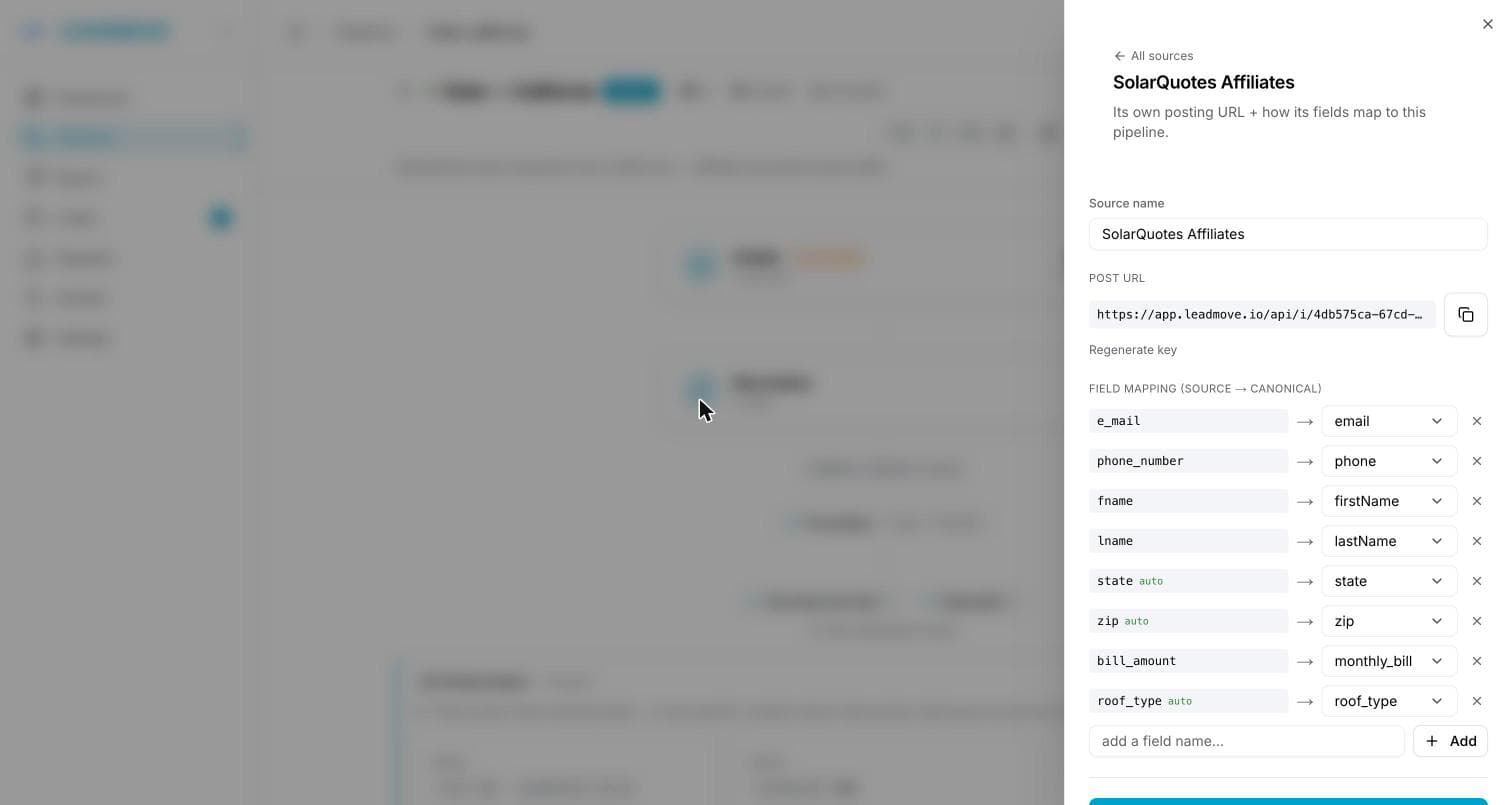
Field mapping
Each source keeps its own map of what they send → what your pipeline calls it.
| Row shows | Meaning |
|---|---|
email_address → email | Renamed on arrival. |
phone → phone with an auto tag | The name already matches one of your fields exactly. |
utm_term → — ignore (don't import) — | Dropped at intake, never stored on the lead. |
| A row with a warning border | Never decided. The field still arrives, under its own name. |
Fields are discovered automatically: every key a source posts is remembered and gets a row the next time you open it. You can also type a field name in the box at the bottom and add it before the first lead ever arrives. Removing a row is temporary — the field reappears if a future lead posts it.
Undecided fields are counted for you: the source list shows ⚠ N to map, and the source editor shows ⚠ N unmapped. It's a to-do list, not an error — those leads were accepted. Map them or mark them ignored to clear the counter.
Save with Save source. Mappings apply to leads arriving after the save.
Fields the source can't provide
Under the mapping, the editor warns when the pipeline requires a field this source never sends: Required by this pipeline but not provided by this source, followed by the fields. Every lead from that source would land as invalid. Two settings fill such fields without asking the supplier:
- Submitted at: the row below the mapping sends the time the lead was received to a pipeline field, for example
optinDate. Ignored until you pick a field. A lead that sends its own value for that field keeps it. - Fixed values: a pipeline field and a value written on every lead from this source, for example
optinUrl= your consent page. A fixed value only fills the field when the lead leaves it empty, and only fields of the pipeline can be picked.
Both apply to leads arriving after the save.
The source field
A supplier can also send a source field in the body — the traffic origin (facebook, google-ads, a sub-id). It's kept on the lead, shows on the lead detail, can be filtered on in the leads list (the Traffic source filter), and is what buyers receive in the source field of their delivery.
It's independent from the source (supplier) the posting URL belongs to: the URL says who sent it, the source field says where they got it. Leave it out and buyers receive direct.
Per-source volume & quality
The source list and the source editor show what each supplier actually sent, over the period selected at the top of the canvas (24h / 7d / 30d / All). Change the period and every number follows.
Each row shows the lead count, plus a counter for anything that didn't come through clean:
| Counter | Meaning |
|---|---|
| invalid | Accepted and stored, but a required field was missing or badly formatted. Not routed to buyers. |
| spam | Caught by the pipeline's spam rules on arrival. Quarantined, not routed. |
| dup | Matched an earlier lead inside the deduplication window. |
Counters are hidden when they're at zero — a clean supplier shows only its volume.
These buckets never double-count. A lead lands in exactly one of them, by precedence: spam first, then duplicate, then invalid. A spam duplicate is counted once, as spam. So invalid + spam + dup is always at most the row's total, and the rest is what reached distribution.
Sources are sorted by volume, busiest first. Past six sources the list scrolls on its own so the rest of the Intake panel stays reachable. The list header tells you how many sources you have and which period you're looking at.
Below the sources you may see extra rows for leads that didn't come from a supplier URL: CSV imports, Manual entries, Forwarded in (from another pipeline), Legacy webhook (posted to the old pipeline-level endpoint, no source attribution) and Deleted sources (leads from a source you've since removed — the leads stay, the URL is gone). Those rows appear only when they're non-zero and aren't clickable: there's nothing to configure.
Need a supplier's URL in a hurry? The copy icon on the right of each row copies its posting URL without opening the editor.
Finding the leads of a source
In the leads list, choose the pipeline in the Pipeline filter, then the supplier in the Source filter that appears next to it. The list, and Export, then hold only that source's leads.
- The Source column, right after Pipeline, names the source each lead came in through, with an icon for its kind (posting URL or Meta form). Leads that didn't come from a source read CSV import, Manual entry or API (posted to the pipeline-level endpoint). On a narrow screen the source sits under the pipeline name.
- The Source filter only lists the sources of the chosen pipeline. Change or clear the pipeline and the source filter clears with it.
- The CSV export has the same Source column.
- A connected assistant understands it too: show me this week's unrouted leads from Vendor A on Solar CA.
Source is the supplier's URL; Traffic source is the source field the supplier sent (see above). They're two different filters.
Duplicating a source
Duplicate source… in the source editor creates a copy of the source you're looking at, with its field mapping already filled in. Use it when a new supplier sends the same field names as one you've already mapped.
The copy gets its own posting URL — a fresh key, never the original's. The supplier feeding the original keeps posting to the same URL and isn't affected.
What you choose in the dialog:
| Field | What it does |
|---|---|
| Target pipeline | Where the copy lands. Defaults to the pipeline you're in; pick another to reuse a mapping across pipelines. |
| Name | Defaults to Copy of …. Rename it to the new supplier — that's how leads are attributed. |
The whole mapping comes across: the renames, the rows you set to ignore, the fixed values, and the field list itself — so the copy opens with the same rows as the original instead of waiting for its first lead. Only the lead counters start empty; volume, invalid, spam and duplicate are always counted from real leads.
If you send the copy to another pipeline, any field that reaches a canonical field here but has no equivalent there is listed before you confirm. That covers renamed fields and fields that simply match by name — the ones that never appear in the mapping because they need no rule. It's a warning, not a block: nothing is dropped from the copy. Add the missing field under Intake → Canonical fields in the target pipeline and it works as-is — or re-map those rows in the copy. See Fields & validation.
Pausing a source
Each source has an Active / Paused switch at the top of its editor.
- Active — the posting URL accepts leads, as usual.
- Paused — posts to that URL are rejected with a
401, immediately. The source, its key and its field mapping are all kept.
Use it to stop a supplier that's sending junk, or to freeze an integration during a migration, without deleting anything and without touching your other suppliers. Flip it back on and the same URL works again — the supplier never has to change anything. A paused source is marked paused in the source list, with a grey dot.
Pausing is the reversible option; Delete source is the permanent one.
Why one URL per supplier
- Attribution. You can see which supplier sent which lead, and cut one off without touching the others.
- Isolation. One supplier's odd field names (
Phone1,E-Mail) are mapped in their source only. - Rotation. Regenerate key on a leaked URL kills that URL alone. Give the supplier the new one first — the old one starts returning
401immediately. - Clean shutdown. Pause a source to reject its posts temporarily, or Delete source to stop that URL for good.
- Measurement. Volume, invalid, spam and duplicate counts are per source, so you can tell a good supplier from an expensive one.
A source added by an assistant
A connected assistant with the change configuration permission can add a source and set its mapping — add a source called Meta Ads to Solar CA, they post em for the email.
What it cannot do is hand you the posting key. The key is a credential: whoever holds it can write leads into this pipeline, so it is generated when the source is created and read here, on this tab, by you. The assistant tells you which source it added and where to open it; the preview says so before you approve.
Regenerating a key is not something an assistant can do either — it silently breaks every integration already posting to the old one, and there is no undo for the traffic lost in between. Use the source's own menu above.
Undoing a source an assistant created switches it off rather than removing it, so the leads it already took keep their attribution.
Common questions
Do all my suppliers have to use different URLs? No, but you lose attribution and per-supplier mapping if they share one. Adding a source takes seconds.
My leads come from Meta lead ads. What do I put the URL into? Nothing: link the instant form directly with Meta form in the Intake panel, and Meta sends each lead to LeadMove. Step by step: Meta lead ads.
A supplier sends fields I don't want. What do I do? Set them to ignore in the mapping. They're dropped at intake and never stored on the lead.
Do CSV imports and manual leads belong to a source? No. Those are one-time entries — the links are at the bottom of the Intake panel, and they're counted on their own rows under the source list. See CSV import and manual entry.
Where do the leads go when I delete a source? Nowhere — they stay in the pipeline, with their history. They're regrouped under a Deleted sources row in the Intake panel, since there's no source left to open.
A supplier added a new field. Do I have to tell them to stop? No. The new field arrives, is stored on the lead, and shows up in the mapping list flagged as unmapped so you can decide what it is.
Does a duplicated source share the original's posting URL? No. Every copy gets its own key, so the two URLs are independent — pause, regenerate or delete one and the other keeps working.
Can two sources map different names onto the same field?
Yes — that's the point. email_address from one and Email from another can both land on email.