Fields & validation
The canonical fields a pipeline expects, and what happens when a lead arrives missing one.
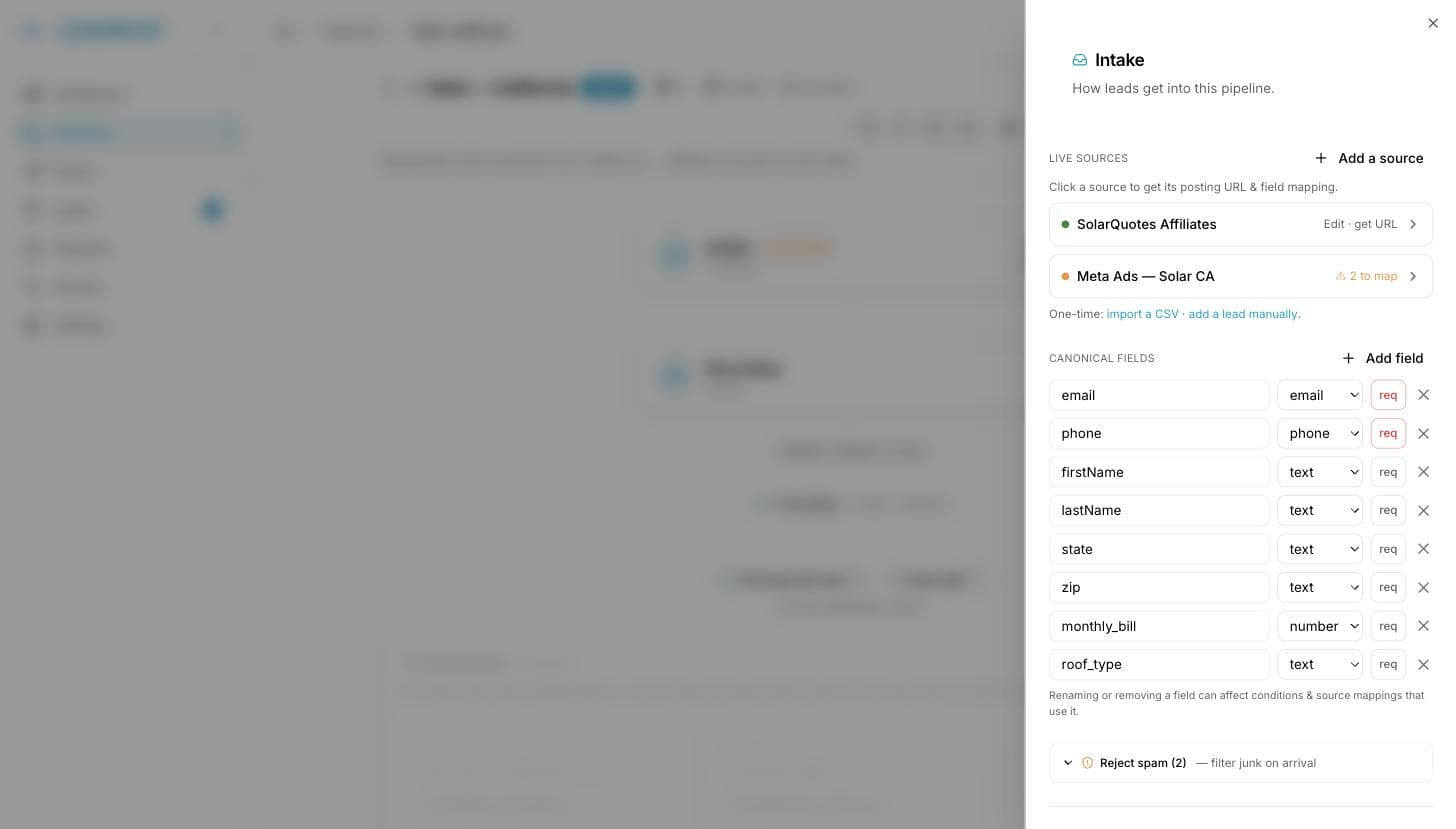
A pipeline's canonical fields are the field names everything else refers to: source mappings, routing conditions, spam filters, deduplication, delivery. Edit them on the canvas: Intake → Canonical fields.
Each field has a name, a type (text, email, phone, number), and a req toggle. The type mainly tells the condition editors how to compare values — number fields get numeric operators (greater than, less than), everything else is compared as text.
The type is a hint, not a straitjacket: routing compares numbers by value whatever form they arrived in, so a lead posting 3 as JSON and one posting "3" from a form or a CSV both match the same rule, and a value that came through formatted (50,000) still compares as fifty thousand.
Name matching
Suppliers don't have to match your spelling. Incoming names are matched case-insensitively, ignoring spaces, underscores and dashes: Email, E-Mail and EMAIL all land on email, and employment_status or EMPLOYMENT STATUS land on a field you named Employment Status. Anything that still doesn't match is kept on the lead under its own name and flagged in the source's field mapping.
Validation
Two checks run on every lead, after normalization and before deduplication:
- Every required field must be present and non-empty.
emailandphone, when present, must be well-formed.
A failing lead is not dropped. It's stored as invalid, never distributed and never billed, and the sender gets an HTTP 422 carrying the stored leadId:
Fix the data at the source and re-post, or open the lead: the Fix this lead card lists what's missing, lets you edit inline, and sends it with Approve & send. The checks re-run before it goes out, so an approval can't push a still-broken lead. The same card exists for unrouted and failed leads, see lead lifecycle.
Invalid leads count toward your plan quota
They're stored, so they count. Spam and rejected duplicates don't. See lead statuses.
Editing a live pipeline
Changes take effect on the next lead in; stored leads keep the data they arrived with. Two things to check after an edit:
- Renaming or removing a field breaks any routing condition, spam condition, normalization rule or source mapping that used the old name. Update them in the same session. Delivery templates are handled for you, see below.
- Making a field required turns every future lead without it into an invalid lead. Confirm your suppliers send it first.
Renaming a field
When you save a rename, LeadMove checks the buyer endpoints this pipeline delivers to. If an email, webhook or SMS template still uses the old code ({suburb}), a dialog lists those templates and offers Rename in templates. Leave them as they are and they send the field empty.
Removing a field only warns: the templates that still use it are listed, and nothing in them changes.
Emails in Automatic mode are built from the pipeline's fields, so they follow a rename by themselves and are never listed. Each template renamed shows up in Activity as an edit of its endpoint.
Common questions
Do I have to declare every field a supplier sends? No. Undeclared fields are still stored on the lead and delivered if a buyer's format asks for them. Declare a field when you want to route, filter, deduplicate or normalize on it — those editors only offer canonical fields.
Can I require phone as well as email? Yes, toggle req on it. Leads without a phone then arrive as invalid instead of being distributed.
Is an invalid lead billed? No. Nothing was delivered, so there's nothing to bill.
Why is my required field reported missing when the supplier says they send it? Usually an empty string — a blank value counts as missing. Check the raw fields on the lead page.
Can I re-send a lead after fixing it? Yes, and it's the same lead — no duplicate is created. Edit it, then Approve & send.