Manual review
Hold incoming leads for approval before they reach buyers, with an optional auto-release delay.
Turn on Manual review in the pipeline's Settings (gear on the canvas). Every clean lead then arrives as held: stored and scored (when scoring is on), but not distributed until someone approves it.
Under the toggle, Auto-release after (minutes) decides what happens if nobody gets to it:
| Value | Behavior |
|---|---|
0 | Manual approval only — the lead waits indefinitely. |
1–1440 (up to 24h) | The lead releases itself and distributes normally after the delay, unless you approve or reject it first. |
Only otherwise-clean leads are held. Spam, rejected duplicates and invalid leads keep their own status and their own review flow — the hold is a quality gate, not a catch-all.
Working the queue
Held leads are listed in Leads under the status filter Held for review (the list refreshes itself while you're on it), and the pipeline canvas shows an amber "Held for manual review before delivery" pill.
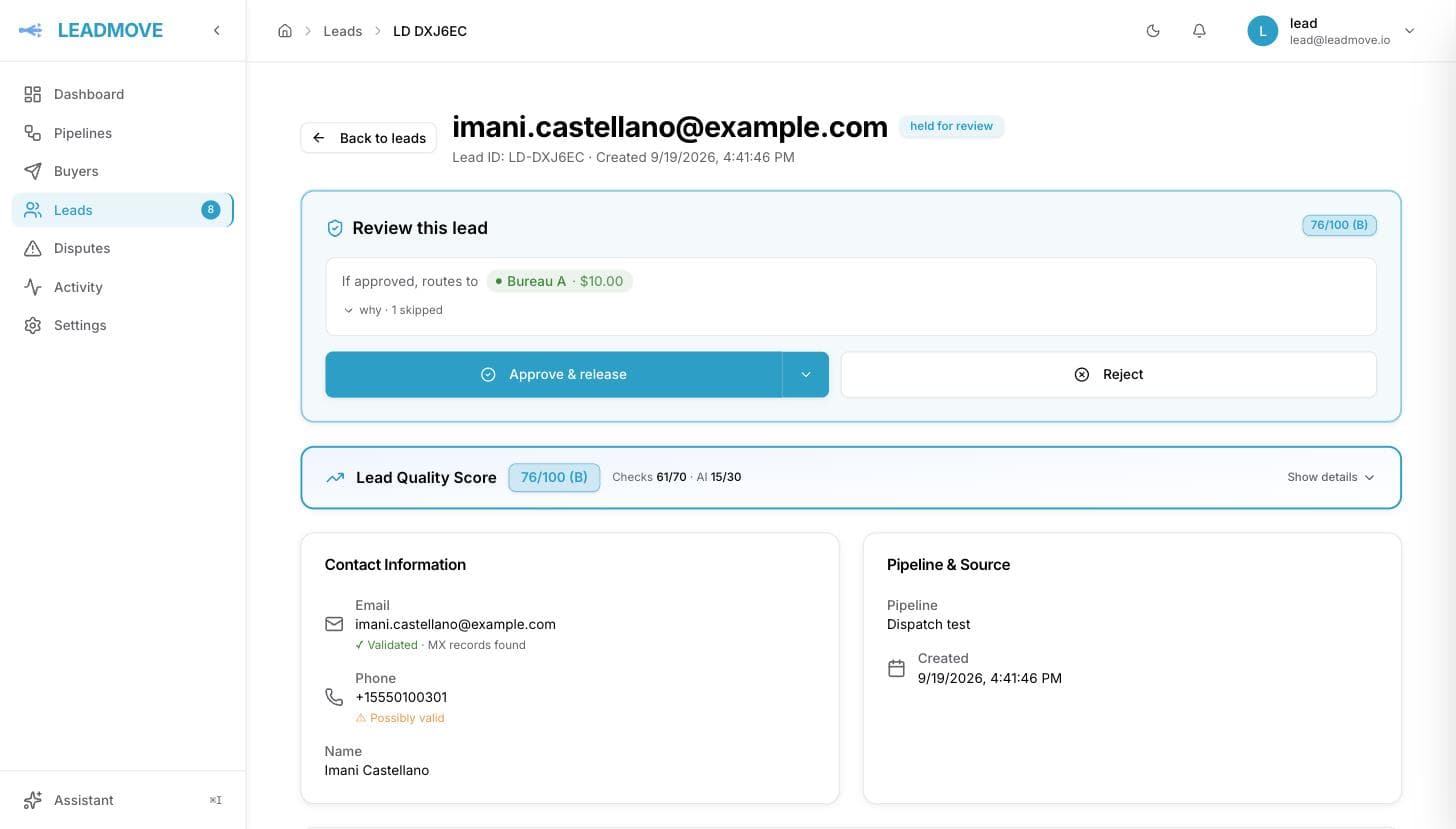
Click a lead in that list and it opens in a side panel, next to the queue — no page to come back from. The Review this lead card gives you the whole decision there:
- Its quality score and grade, when scoring is on for your organization.
- If approved, routes to — the buyers it would go to and at what price, plus a "why · N skipped" list explaining every buyer that wouldn't get it.
- A warning when a selected buyer is currently outside its operating hours: approving won't force delivery, the lead is delivered at the buyer's next open window.
- A live countdown when auto-release is configured.
- Approve & release, Send to a buyer instead… (in the chevron next to it) and Reject.
Approving starts normal distribution immediately: your routing rules pick the buyer, as the preview says. Send to a buyer instead… is for when the destination is a judgement call, not something your rules can read in the data: you pick the buyer (and, if you want, one of its delivery methods), and the lead is approved and delivered to that buyer in one action. It runs every guard a manual assignment runs — the buyer's duplicate window, its caps, its prepaid balance — and refuses before anything is sent when one of them says no, so the lead is never delivered to two buyers by accident. The dialog remembers the last buyer you picked, so a run of leads for the same desk is one click each. Owners and admins see it; members see the plain Approve. Rejecting is final — the lead stays as rejected and is never distributed.
The panel keeps reading below the decision: where the lead went (each buyer, method, time and price, and what was billed), why it went nowhere when it did, what happened to it since, and which door it came in through. It scrolls on its own — the list behind it stays where you left it.
In bulk
Select held leads in the list (the header checkbox takes the page) and the action bar offers two ways out of the queue. Approve (N) releases them to your routing rules in one click — the same decision as Approve & release, once per lead, and the toast's Show these N opens exactly the leads that went. Send to buyer… approves them and delivers them to the buyer you pick, with the same guards as a single send; the dialog then says what went through and what did not. Approve is for every member, Send to buyer for owners and admins.
Filter the queue by buyer
Leads → filters → Buyer. It shows the leads sent to that buyer, plus the leads still held that would route to it if you approved them now — each of those says Would route to and the buyer's name in the delivery column. Useful when several buyers queue leads and you release them in batches through the day.
"Would route to" is what your routing rules say today, read the way distribution reads them: the lowest tier whose rules accept the lead wins, so a buyer in tier 2 never appears while a tier-1 rule accepts. When an exclusive pipeline has several buyers in that tier, the row says one of N (hover for the names): distribution draws among them at release. In a shared pipeline every buyer of the tier gets the lead, and the row names them all. Caps, operating hours, dedup and prepaid balances are only checked at release, so a lead listed here can still be skipped for that buyer at that moment. The review card on a single lead remains the exact answer, buyer by buyer.
If the buyer you have in mind never shows up under the filter, that is the answer too: your rules would not send it there. Send to a buyer instead… on the review card is how you override them for one lead.
From the keyboard
↑ / ↓ (or j / k) move the panel to the next lead in the list, Esc closes it. After each decision the panel moves on by itself to the next lead still waiting, and says Review queue clear when there is none left.
Cmd-click (Ctrl-click on Windows) a row, or use its View link, to open the full lead page instead: that's where you edit a lead's fields and read its whole history. The panel's address is in the URL, so a link to what you're looking at can be shared as is.
Approval and forwarding
Held leads don't trigger forwarding rules while they wait. The rules are evaluated at release — manual or automatic — and the review card previews the outcome:
- A matching copy rule sends the lead to the other pipeline and distributes it here.
- A matching transfer rule makes the lead leave: it's marked transferred, and this pipeline's buyers don't receive it.
Common questions
Can I pick which buyer gets a held lead? Yes. On the review card, open the chevron next to Approve & release, choose the buyer, and the lead is approved and sent there in one step — your routing rules are not consulted for it. The activity line on the lead says where it went and where the rules would have sent it. If a forwarding rule in transfer mode matches the lead, the option is disabled: the lead has to leave for the other pipeline, approve it to let it go.
Do held leads still get scored? Yes — that's the point. The grade is on the card before you decide. Unless your organization has turned scoring off, in which case nothing is scored and the card shows the routing preview alone.
What if I approve at the exact moment auto-release fires? Whichever lands first wins, and the lead is only distributed once.
Does manual review slow every lead down? It holds every clean lead in that pipeline. Run it on the pipelines that need it — a new supplier on trial, a buyer with strict quality terms — rather than account-wide. Set a delay so nothing sits forever if your team is offline.
Can a buyer tell a lead was held? No. Buyers receive it exactly as they would have, just later. What they do see is the age of the lead, so keep delays short for time-sensitive verticals.
What's the difference between held and deferred? Held waits for your approval before distribution. Deferred happens after: the lead is sold and waits for the buyer's opening hours. See lead statuses.
Frequently asked questions
Can I check leads before they go to buyers?
Yes. Turn on Manual review in the pipeline's settings and every clean lead arrives as held, scored but not distributed, until someone approves it. Set an auto-release delay of up to 24 hours so nothing waits forever when your team is offline.
Can I decide which buyer gets a held lead?
Yes. The review card shows where your rules would send it and at what price; Send to a buyer instead lets you pick the buyer, and one of its delivery methods, and approves and delivers in one action. Bulk Approve and bulk Send to buyer work the same way on a selection.
Does the buyer know a lead was held?
No. Buyers receive it exactly as they would have, just later, and the activity line on the lead records where it went and where the rules would have sent it. What a buyer does see is the age of the lead, so keep auto-release delays short in time-sensitive verticals.