Forwarding between pipelines
Copy or transfer matching leads into another pipeline, where they run that pipeline's own intake and distribution.
Forwarding sends a lead from one pipeline into another. Enable it in Settings → Forwarding; a Forwarding step then appears on the canvas, above your buyers. Each rule reads when these conditions match → send to that pipeline, in one of two modes.
| Mode | What happens to the lead |
|---|---|
| Copy | Goes to the other pipeline and keeps distributing to this pipeline's buyers. |
| Transfer | Leaves this pipeline entirely — status transferred, and this pipeline's buyers never see it. |
Rules are cumulative: a lead is sent to every pipeline whose conditions match, not just the first. If any matching rule is a transfer, the lead leaves — one transfer beats any number of copies.
Conditions use the fields the pipeline collects. Quality score and grade aren't among them: forwarding is decided the moment the lead arrives, before scoring has run. Forward on the data, and let the destination pipeline route on quality.
A rule pointing at a pipeline that is paused or archived is skipped, and the skip is recorded in your activity log so you can find the dead rule. A transfer rule never strands a lead this way: if its target isn't active, the lead simply stays here and is distributed to your own buyers.
Chains are tracked across manual review too, so two pipelines forwarding to each other stop instead of passing the same lead back and forth. A lead crosses at most five pipelines.
The receiving pipeline runs its own full intake: normalization, spam filter, deduplication, validation, review gate, then distribution. A forwarded lead can perfectly well be quarantined or deduplicated on arrival there.
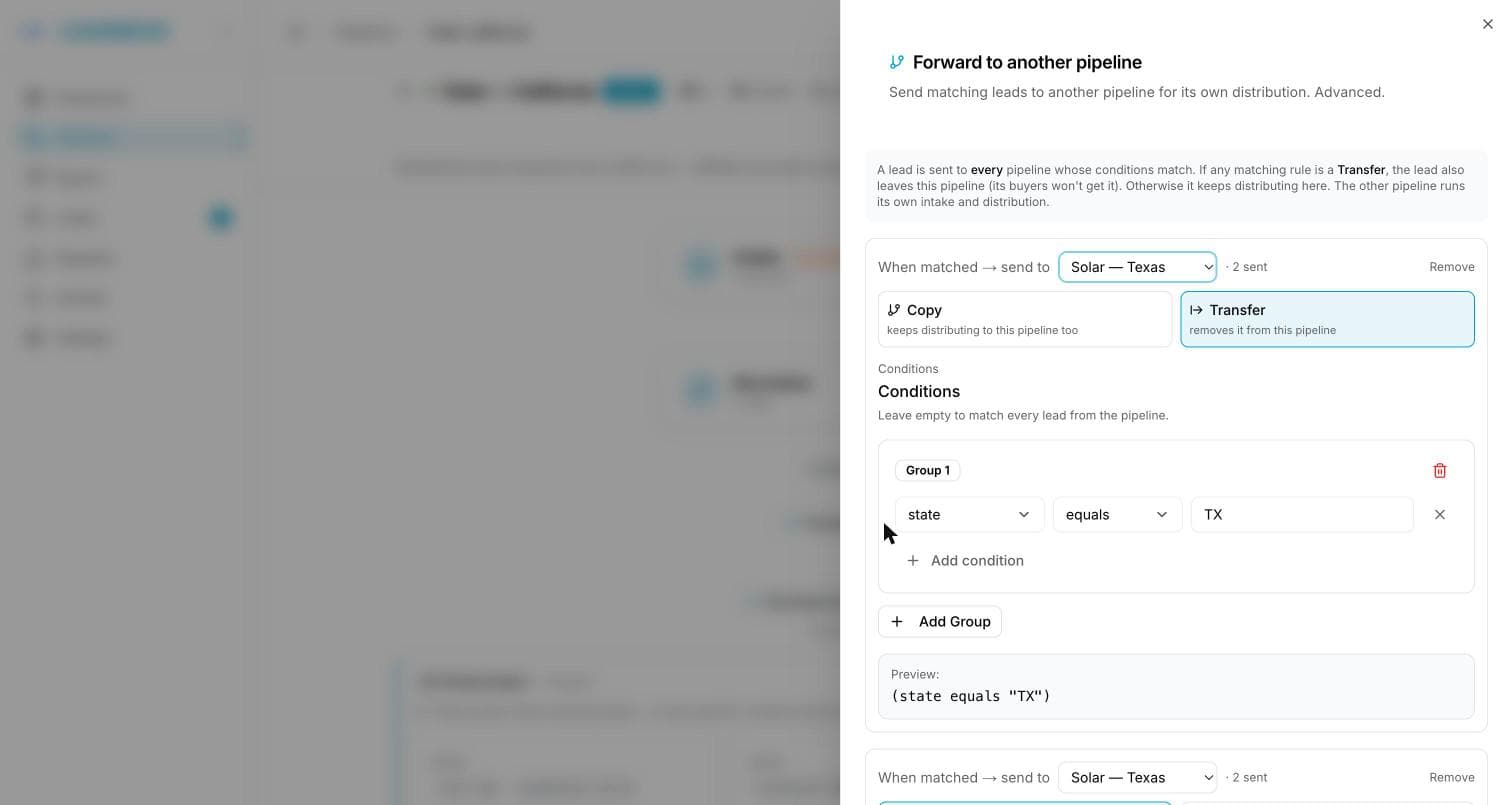
A rule with no conditions forwards everything
Conditions are optional, and an empty condition set matches every lead — that's how you mirror a whole pipeline. The rule shows "No conditions → forwards every lead" underneath. Combined with Transfer, this empties the pipeline of all its traffic, so double-check the mode before saving.
Reading the flow
Each rule shows how many leads it sent in the canvas's time window (· 12 sent). The receiving pipeline's canvas says "Also receiving forwarded leads from …", with a link back to the rule.
A few guardrails:
- Only clean leads forward. Spam, rejected duplicates, invalid leads and held leads don't — held ones are re-evaluated when they're approved or auto-released.
- If the target pipeline is paused or archived, the forward is dropped silently. Activate the target first.
- A lead never returns to a pipeline it has already been through, and a forwarding chain stops after 5 pipelines.
- A forwarded lead doesn't count twice toward your plan's monthly quota — it was counted where it first entered.
Common questions
When would I use transfer instead of copy? Transfer for triage: one intake pipeline receives everything from a supplier and routes each lead to the right vertical pipeline. Copy for overflow or mirroring: sell in the main pipeline and offer the same lead to a second set of buyers.
Will the same buyer receive the lead twice with a copy rule? Only if that buyer is on both pipelines and its own duplicate window has passed. Inside its window, distribution skips a buyer that already received the same email or phone — see deduplication.
Is a forwarded lead billed twice? It's billed per delivery, as always. A copy that sells in both pipelines is two deliveries to two buyers — two billable leads.
Why did my forward not arrive? Most common causes, in order: the target pipeline isn't active; the lead was quarantined by the target's spam filter or dedup; the lead was never clean here (spam/invalid/duplicate); forwarding is switched off in Settings.
Where do I see that a lead was forwarded? On the original lead's Activity list ("Forwarded to …"), and on the receiving pipeline's canvas, which names the pipelines feeding it.