Deduplication
Catch the same person arriving twice in a pipeline, and decide whether those leads still go to buyers.
Open the pipeline canvas → Settings (gear) → Deduplication. You choose which fields identify a person, how far back to look, and what to do with a match.
A lead is a duplicate when any selected field matches an earlier lead in the same pipeline inside the window — the fields are OR'd, not AND'd. Pick email and phone to catch more: same email or same phone is enough.
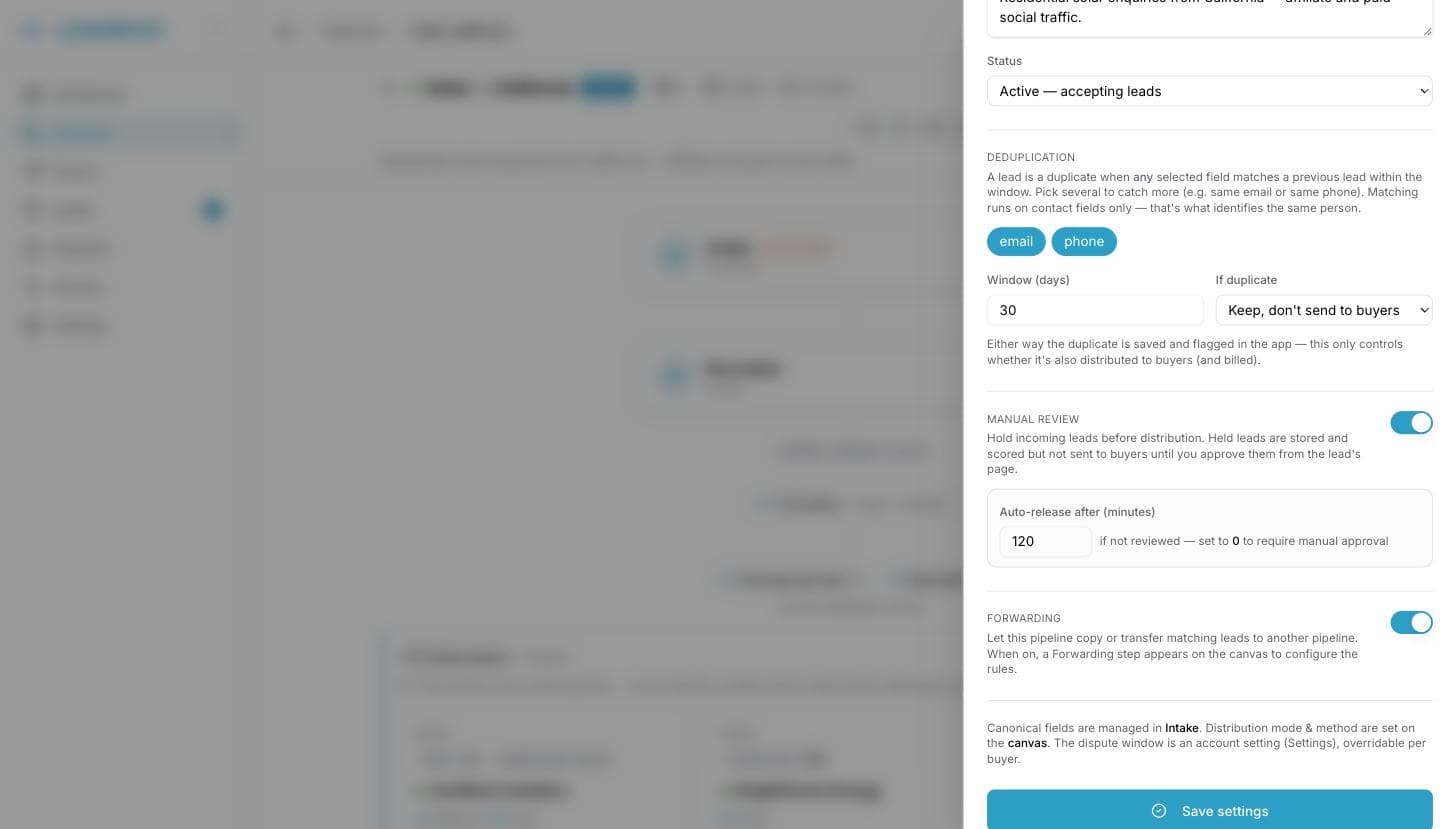
| Setting | Values | Default |
|---|---|---|
| Fields | Your contact fields — email, phone, or both | email |
| Window (days) | 1 to 365 | 30 |
| If duplicate | "Keep, don't send to buyers" / "Send to buyers anyway" | Keep, don't send |
Comparison happens on the normalized value, so a lowercase transform on email makes matching case-insensitive.
What happens to a duplicate
Either way, the lead is stored and flagged in the app — you always keep the trace, and the lead page links back to the original. The action only controls what happens next:
| Action | Result |
|---|---|
| Keep, don't send to buyers (default) | Status duplicate. Never distributed, never billed, and it does not count toward your plan's monthly lead quota. |
| Send to buyers anyway | Distributed and billed like any other lead, still flagged as a duplicate for your reporting. |
The supplier isn't told off either way: the posting URL still answers 200, with "duplicate": true in the body. Senders that treat a duplicate as a failure and retry are the main cause of duplicate storms — see the webhook reference.
CSV imports use the same rules, and additionally deduplicate rows against each other inside the file.
The other duplicate window
This setting is about your inventory. Each buyer has its own duplicate window (30 days by default): during distribution, a buyer is skipped if it already received a lead with the same email or phone inside that window — even when the lead is perfectly new to your pipeline. That window spans every pipeline the buyer sits in, and only counts leads it actually received: a delivery that failed or that you canceled doesn't make the next lead a duplicate for them. That's set per buyer, in buyer settings.
Common questions
Which fields should I select?
email and phone together is the standard setup. Deduplication is built around the contact fields — that's what identifies a person across suppliers.
Am I billed for duplicates? Not under the default action: nothing is delivered, so nothing is billable, and they don't consume your monthly quota either.
Two suppliers sent me the same person. Which one wins? The first one to arrive. The second is flagged as the duplicate, with a link to the original — useful evidence when a supplier bills you for it.
Can I sell the same person again later? Yes. Once the window has passed, the lead is treated as new. A 30-day window on a 90-day sales cycle means you can resell at day 31.
Legitimate leads are being flagged. What do I change? Narrow the field list (phone-only households share numbers) or shorten the window. To check a specific case, open the lead — it shows which earlier lead it matched.
Frequently asked questions
Can LeadMove stop me selling the same person twice?
Yes. Choose the fields that identify a person, email and phone together is the standard setup, a window from 1 to 365 days, and what to do with a match. By default a duplicate is kept and flagged but never sent to a buyer, never billed, and never counted toward your quota.
Does deduplication work across my pipelines?
Pipeline deduplication is per pipeline. Buyer deduplication is the cross-pipeline check: each buyer has its own duplicate window, 30 days by default, spanning every pipeline it sits in, and is skipped for a lead it already received, even when the lead is new to your pipeline.
Can I resell a lead after a while?
Yes. Once the window has passed the lead is treated as new. A 30-day window on a 90-day sales cycle means you can resell at day 31. Shorten the window or narrow the field list if legitimate leads are being flagged.