How distribution works
The two pipeline settings that decide which buyer gets a lead, and how buyer quotas set each one's share.
Two settings on the pipeline decide everything. Distribution mode says how many buyers get the lead. Distribution method says how you split leads between them. Both sit above the buyer list on the pipeline canvas.
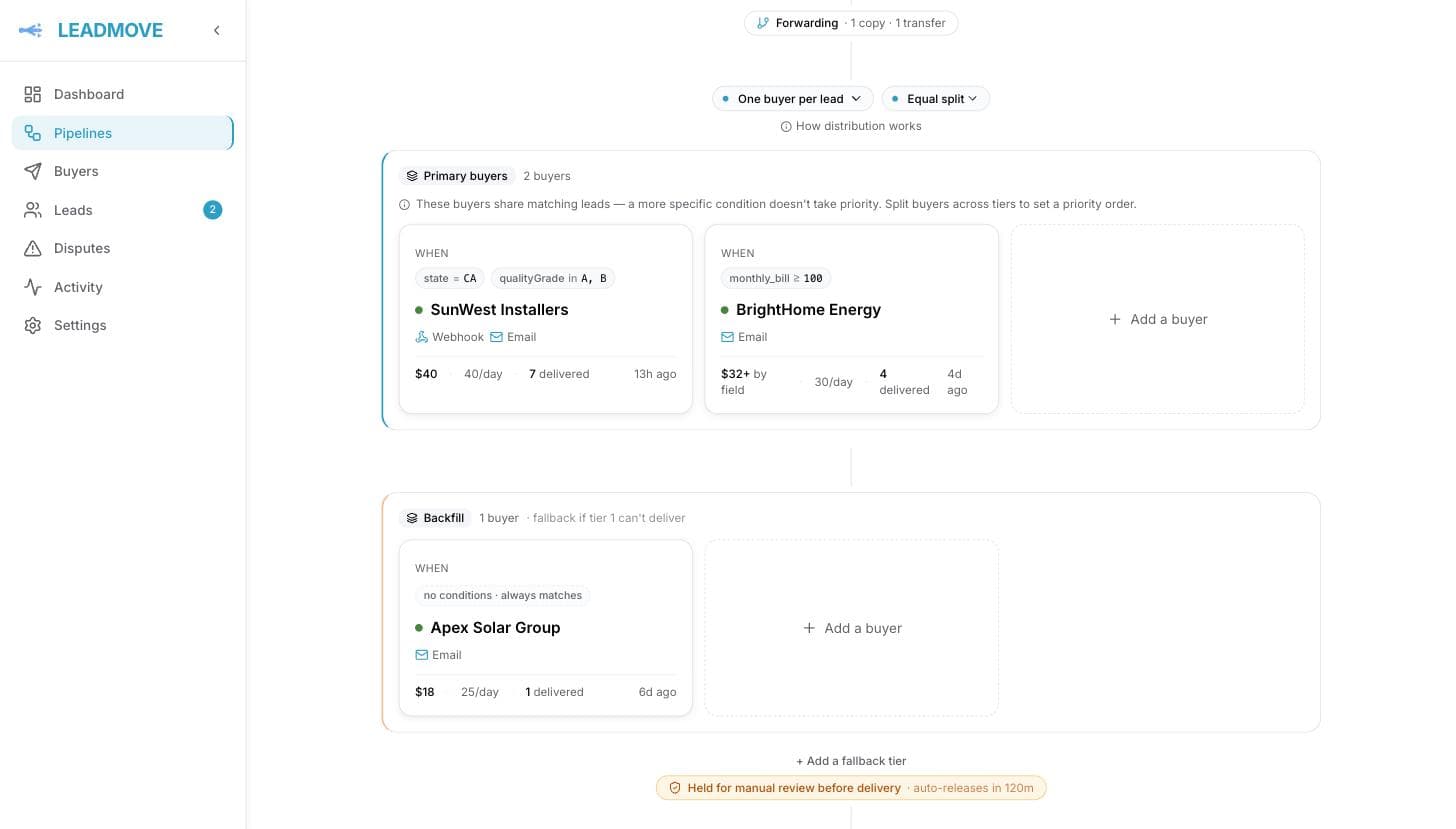
Mode: one buyer, or all of them
| Mode | What happens |
|---|---|
| One buyer per lead | Exactly one buyer in the winning tier receives the lead. Everyone else is skipped. |
| All matching buyers | Every eligible buyer in the winning tier receives the lead at the same time. Each one is a separate delivery, billed separately. |
Method: equal split or weighted
Only applies to One buyer per lead — the method selector is disabled in shared mode, because there's no draw to run when everyone gets the lead.
| Method | What happens |
|---|---|
| Equal split | The least-filled buyer wins. Fill is measured against how far into its quota period the buyer should be, so leads spread evenly across the day/week/month instead of dumping on one buyer first thing Monday. Between equally-filled buyers, the one that received a lead least recently wins, so buyers that never fill up take turns. |
| Weighted | A random draw biased by each rule's weight, still nudged by pacing. A buyer's rough share is its weight ÷ the total active weight in its tier — the number is shown under Advanced on the buyer panel. |
Weighted picks are random draws, so small samples look uneven: a 3/1/0 split over four leads is normal, and shares converge on the configured weights as volume grows. Pacing sits on top — a buyer behind its pace for the period gets a boost, one ahead gets dialled down — and a buyer that has received nothing yet is always boosted at least as much as one that has.
An uncapped buyer is never 'ahead of pace'
With no quota it sits at 0% fill for ever, so it keeps the full boost in weighted and keeps winning in equal split. Give every buyer in the pipeline a quota if you want a predictable split — the same warning as in Quotas and caps.
How quotas set each buyer's share
Under equal split, a buyer's quota is its share. Three buyers in the same tier, all matching:
| Buyer | Quota | Rough share of leads |
|---|---|---|
| A | 100/week | 55% |
| B | 50/week | 28% |
| C | 30/week | 17% |
A buyer with no quota set is unlimited: it never fills up and never hits a cap.
If a buyer sets several quotas, the shortest period wins — daily beats weekly beats monthly.
Same tier means shared, not ranked
Inside a tier, every rule whose conditions match is a candidate. A narrower condition does not beat a broader one. To give one buyer first refusal, put it in an earlier tier — see Tiers and fallback.
Who gets skipped
A buyer that matched the conditions can still be passed over: it's at quota, it's outside its operating hours, it already received this same person inside its own duplicate window, it's prepaid and its balance won't cover this lead's price, or its endpoint keeps failing and buyer health has paused it for 30 minutes. The lead page's routing trace names the reason for each one.
Common questions
Does weighted do anything in "All matching buyers" mode? No. Every eligible buyer receives the lead, so weights and the method setting are ignored. The selector is greyed out.
One buyer is getting far more leads than its weight suggests. Why? Two things, in this order. Over a handful of leads it's usually chance — weighted is a random draw. Over a period, it's pacing: a buyer behind its quota pace is boosted, one ahead is reduced. Shares converge on the weights across a full quota period.
What happens when no buyer matches at all? The lead is marked unrouted and stays in your leads list. Fix the cause — a cap, a condition, a closed buyer — then hit Re-run distribution on the lead page to give it another pass. For a batch, filter the leads list on Status: Unrouted, select the page and hit Retry routing (up to 100 at a time). When the only cause is that the matching buyers were at cap or closed, the pipeline can retry by itself once a cap resets or a buyer reopens: Retry when capacity returns, in its settings — see When every buyer is at cap. See also Lead statuses explained.
Can I send a sold lead to a second buyer? Yes, from its lead page: pick the buyer under Manual Lead Assignment. In an exclusive pipeline, when the first buyer still has a live delivery (queued, waiting for its hours, or delivered), you are asked to confirm before the second one is sent — one lead reaching two desks by accident is what the confirmation prevents. In a shared pipeline every matching buyer gets the lead by design, so nothing is asked.
Do I set quotas on the pipeline or on the buyer? On the buyer — quotas are per buyer, across every pipeline it sits in. Tier and weight are per rule, so the same buyer can be tier 1 in one pipeline and tier 2 in another.
Frequently asked questions
Can I sell the same lead to several buyers at once?
Yes. Set the pipeline's distribution mode to All matching buyers and every eligible buyer in the winning tier receives the lead at the same time, each as a separate delivery billed at that buyer's own price. One buyer per lead is the exclusive alternative.
How does LeadMove split leads fairly between buyers?
Under Equal split, the least-filled buyer wins, measured against how far into its quota period it should be, so leads spread across the day instead of piling on one buyer. Under Weighted, a random draw biased by each rule's weight, still paced by quota fill. Quotas set each buyer's share.
What happens when a buyer hits its cap or is closed?
It is skipped for that lead and the next eligible buyer takes it, or the lead falls to a lower tier. If nobody is left the lead is marked unrouted and kept; you can retry it, or turn on Retry when capacity returns so the pipeline retries by itself when a cap resets or a buyer reopens.