Field mapping and transforms
How to declare which fields a buyer receives, under which names, and how to reformat each value before it is sent.
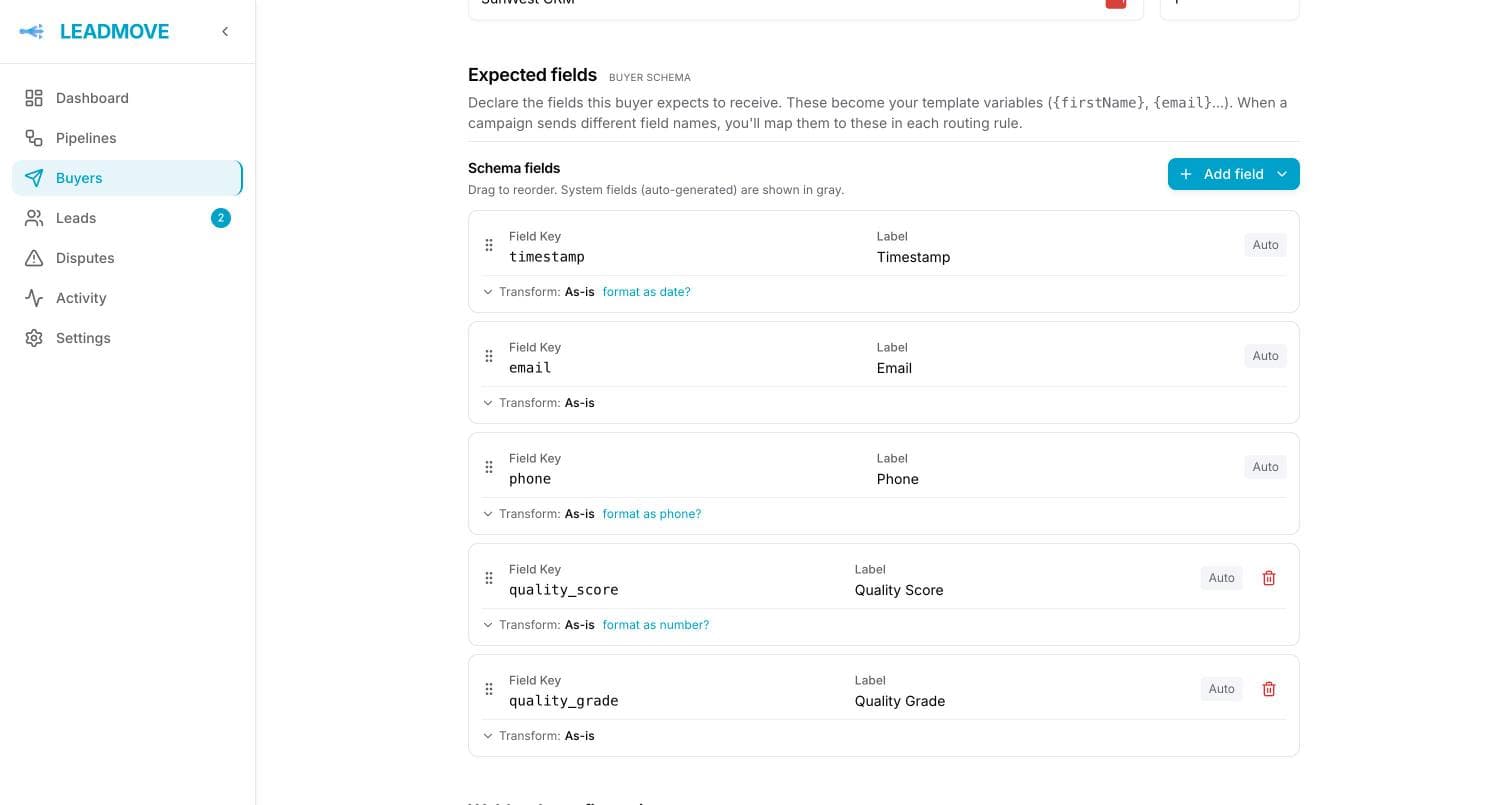
Each delivery method has an Expected fields list — the buyer's delivery schema. It decides exactly which fields leave LeadMove, in which order, and under which names. Everything else stays behind.
Edit it on the delivery method's page, under Expected fields.
This is not a passthrough
Only the fields declared here are ever sent. A schema field with no mapping goes out empty, and a pipeline field the schema doesn't declare never reaches the buyer, whatever it's named. Adding a field to your pipeline does not add it to a buyer's delivery.
Two kinds of field
System fields are filled by LeadMove on every lead, so they always resolve:
| Key | Value |
|---|---|
timestamp | Delivery time |
email, phone | The lead's contact details |
lead_id | The lead reference, e.g. LD-7QK4M2 |
pipeline | The pipeline the lead came from (campaign still works as a legacy alias) |
buyer | The receiving buyer's name |
source | Traffic source, direct when unknown |
quality_score / quality_grade | Score 0-100 and grade A-D (Using grades) |
New delivery methods start with timestamp, email and phone, but nothing is locked: remove any field the buyer doesn't want, and add it back later from Add field → System fields.
Mapped fields are your pipeline's data. You declare the name the buyer expects here, then line your own field name up with it in each routing rule's Field mapping (Routing rules).
Attribution fields say where the lead came from on a connected ad platform: platform, organic, campaign, ad set, ad and form, with their IDs. There is nothing to map. Pick one under Add field → Attribution (from the ad platform) and it goes out under the key you give it, filled for leads from Meta Lead Ads and empty for the others. To send all of them without a schema, switch on Include attribution on the webhook, email or Google Sheets method instead: the attribution_* fields are added after the lead's own. Both are off until you choose them, so a buyer never sees your campaign names by default.
Each row has a key and a label. The key is the name the buyer's system sees in a webhook payload, and the variable you use in templates ({zip}, the value after its transform; the lead's own answer is {lead.zip}, see Two kinds of codes). A key can't contain a dot. The label is the human column title used in the Google Sheets header. Drag rows to change the order of the columns or payload keys.
Per-field transforms
Every field can be reformatted right before it's sent. Default is Send as-is.
| Transform | Options |
|---|---|
| Map values | Pairs like sedan → car. Case-insensitive. If a value matches no pair: keep original, send empty, or send a fixed value |
| Text case | UPPERCASE, lowercase, Title Case |
| Phone format | E.164 (+15551234567), National ((555) 123-4567), International (+1 555 123 4567), Digits only (5551234567: the number as dialled in its country, so 0826235559 for a South African number received as +27826235559) |
| Date format | Incoming: auto-detect, MM/DD/YYYY, DD/MM/YYYY, YYYY-MM-DD, MM-DD-YYYY, Unix. Send as: a list of examples — 08/29/2026, 08/29/2026 9:25 AM, 29/08/2026 09:25, 2026-08-29 09:25, Aug 29, 2026 at 9:25 AM EDT — plus Unix timestamp and ISO 8601 |
| Number format | Decimals (auto, 0, 1, 2) and an optional thousands separator |
| Fixed value | Always sends the same value, whatever the lead carries — how you pass a buyer's constant, like an account key |
Two options apply on top of any transform: Trim spaces (before) and If empty, send… (after, when the result would be blank).
Each date format is offered as the value it produces rather than as a mask, and every one of them can carry the time. The hour follows the format: an American spelling reads 9:25 AM, a European or ISO one reads 09:25. Only Aug 29, 2026 at 9:25 AM EDT names the time zone — the others stay parseable for whatever reads them downstream.
Times are written on the buyer's clock when that buyer has operating hours, and on your organization's otherwise. Date-only formats keep rendering exactly as they always have, so nothing already flowing to a webhook or a spreadsheet shifts.
The editor shows a live example under each transform — the same code that formats the real delivery. If a value can't be converted (an unparseable date, a phone number with no country), it is sent unchanged rather than dropped. A phone number without its country code is read in the lead's country field, else the pipeline's default country, then the visitor's country, then the United States.
Or format it inside a merge code
A transform applies to a field for every delivery of this method. To reformat one value in one place instead, put a modifier in the merge code itself — {{phone|phone:e164}}, {{first_name|title}}, {{zip|default:not given}}. Same formats, same behaviour, written where you use it. The full list is in Email deliveries; the same codes work in webhook Custom JSON bodies and GET parameters.
The transform runs first, the modifier second — so a field already formatted by its transform can still be upper-cased in one email.
This is also the only place a format lives: a webhook body, a form field or a GET parameter that uses {phone} sends the phone as formatted here.
Common questions
The buyer says a field arrives empty. Where do I look? The field is in the schema but nothing feeds it. Check the routing rule's field mapping for that pipeline — an unmapped schema field is sent empty.
Do I have to redo this for every pipeline? No. The schema belongs to the delivery method, so it's written once per buyer. Only the mapping — your field name to their field name — is per routing rule.
My buyer wants dates as DD/MM/YYYY and everyone else wants ISO.
Set a date transform on that one buyer's field. Transforms are per delivery method, so nobody else is affected. Cleaning data for all buyers belongs upstream instead: Data normalization.
Can I send a value the lead doesn't contain?
Yes — add the field and give it the Fixed value transform. It applies in the standard payload and in a custom body template alike: {utm_source} sends the constant.
Delivery methods
The four ways a buyer can receive leads — email, webhook, Google Sheets, SMS — and how several delivery methods on one buyer work together.
Webhook deliveries
Sending leads to a buyer's API as a JSON body, as form fields or as URL parameters: paste the buyer's example where it goes, the standard payload or a custom JSON body, headers, reading the buyer's response, and what a failure looks like.