Webhook deliveries
Sending leads to a buyer's API as a JSON body, as form fields or as URL parameters: paste the buyer's example where it goes, the standard payload or a custom JSON body, headers, reading the buyer's response, and what a failure looks like.
A webhook delivery method sends one request per lead to the buyer's URL: a POST with a JSON body, a POST with form fields, or a GET with the fields as URL parameters. You answer How does this buyer receive leads?, paste the example from their docs where it goes (a URL in Webhook URL, a JSON body in Custom JSON), and check the request before going live.
Pick JSON body (POST) when the buyer's docs show a JSON example, Form fields (POST · form) when they show fields posted like an HTML form (see Sending as a form post), and URL parameters (GET) when they show a URL with ?name=value (see Sending with GET). All three read the same way, top to bottom: the URL, what is sent, the line that says which formats apply, Headers, Buyer response, then the checks. The URL must be https:// and publicly reachable, and redirects are not followed.
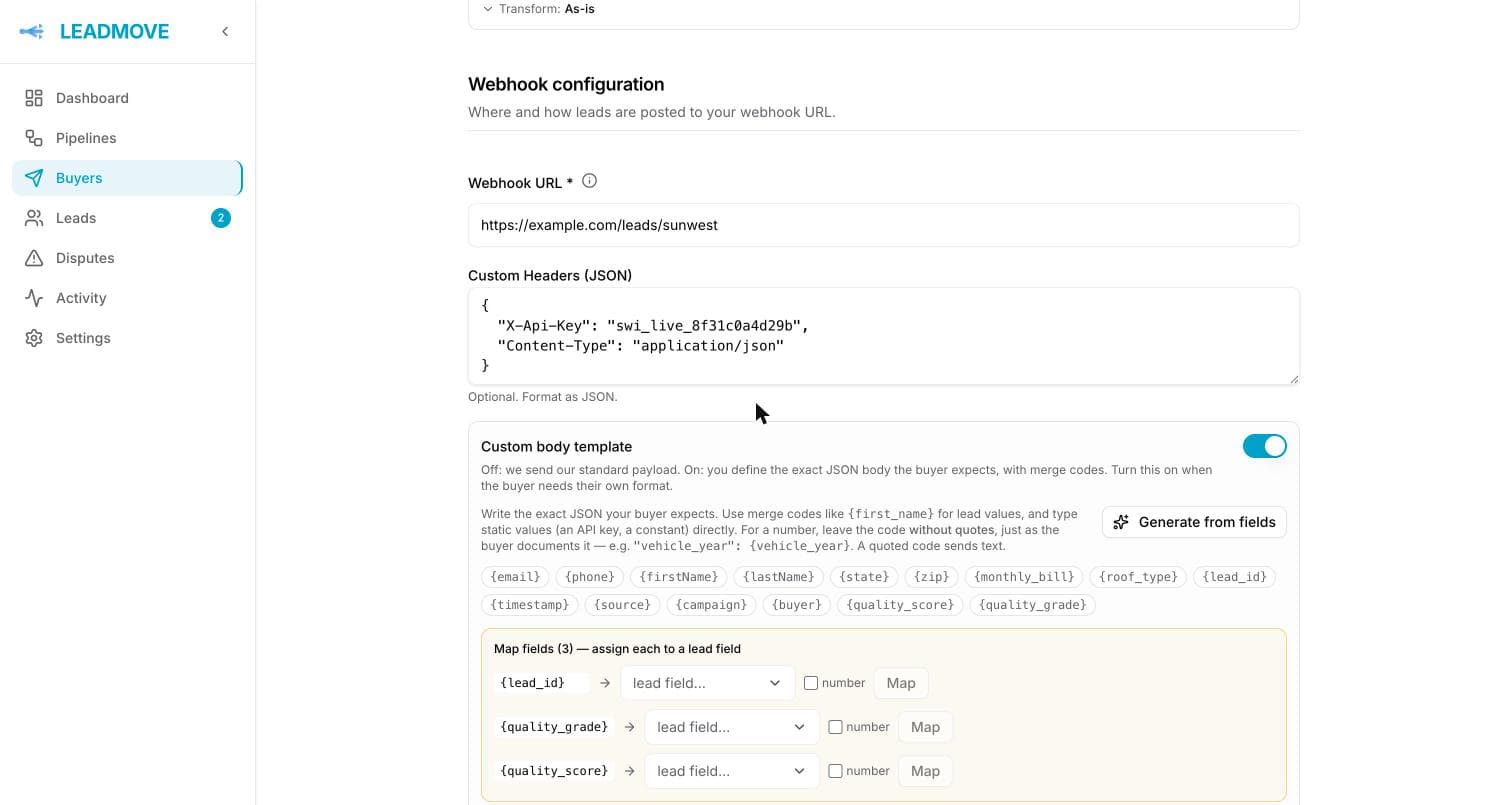
Custom headers
Under Headers, folded until you add one. Add one row per header, a name and a value, for example Authorization and Bearer your-token. Values of headers named like a credential (Authorization, anything with key or token) are masked; click the eye to show them. Edit as JSON shows the same headers as a JSON object, if you prefer to paste them.
Your headers are sent on top of the lead reference headers and the Content-Type, which LeadMove sets for you: application/json for a JSON body, application/x-www-form-urlencoded for form fields, none for a GET. A Content-Type header you add replaces ours on a JSON body; on form fields it is replaced, and the editor says so.
Headers set through an assistant are write-only
A connected assistant can set these headers for you and can never read one back — not in a preview, not in the activity log, not in an answer. It sees that an Authorization header exists, never what is in it. The consequence is worth knowing before you use it: undoing a change an assistant made to the headers cannot put the old value back, because the old value was never kept. Replace it here if that happens.
The standard payload
With Body set to Standard payload, the buyer receives this envelope (See the shape shows it in the editor). lead contains the delivery method's expected fields, already transformed:
Include attribution, under Standard payload, adds the thirteen attribution_* fields (platform, campaign, ad set, ad, form and their IDs) at the end of lead, empty for leads without attribution. It's off by default, so your campaign names stay yours. A schema or a custom template decides for itself what is sent, so the switch only acts on this standard payload. See Meta Lead Ads › Attribution.
Custom JSON
Pick Custom JSON when the buyer documents its own contract. The editor starts from your expected fields, one merge code each plus {lead_id}. The fastest way in is to paste the sample body from the buyer's docs straight into the editor: each value that matches a lead field by its name (email, postcode, first_name…) or its shape (an email address, a phone number) becomes that field's merge code. Values that look like a key stay as they are. The line under the editor says what changed, for example "3 sample values replaced · 1 kept, check it below", with Undo. Pasting over a body you already edited asks first: Replace the body or Keep mine.
Values nothing matched are listed in Fill in the fields, with the empty values and foreign tokens ([firstname]) of the example: pick the lead field for each, or click Keep if the buyer really expects that exact value. Start over from Expected fields puts the starter body back.
Quoting decides the type: "year": "{vehicle_year}" sends text, "year": {vehicle_year} sends a number. Static values (an API key, a constant) are typed directly. The editor validates the JSON as you type and flags unknown merge codes.
Available merge codes: every expected field of this delivery method as {field}, every field of the pipelines wired to the buyer as {lead.field}, plus the system codes {timestamp}, {email}, {phone}, {lead_id}, {pipeline}, {buyer}, {source}, {quality_score} and {quality_grade}, and the Attribution codes ({attribution_campaign_name}, {attribution_ad_id}…), filled for leads from a connected ad platform and empty otherwise. Templates saved with the old {campaign} or {meta_campaign_name} codes keep working.
A value can mix text and several merge codes, which is how a field is built from other answers: "description": "Property: {lead.property_type}. Timeline: {lead.timeline}. {lead.description}".
Two kinds of codes
{lead.situation}is the lead's own answer, as submitted: no mapping, no format.{situation}is the expected field: the value after the rule's field mapping and its format (a value map, a date, a phone format).- They differ when a name is both a pipeline field and a formatted expected field. The editor then says so under the body.
- Example: with
situationset to a value map,"situation": "{situation}"sends1while"description": "Situation : {lead.situation}"sendsSituation : propriétaire.
Bodies written before {lead.…} existed keep working: a code named after a pipeline field that is not an expected field still sends the answer as given.
Formats (case, phone, date, value maps) are set once in Expected fields: a merge code sends the formatted value wherever you use it. The line under the body lists the formats in force, with Edit formats to jump to them. A code written with a modifier, such as {phone|phone:e164}, still works, and {email|sha256} sends the value hashed (trimmed, lowercased, a phone as digits only), the form ad platforms ask for.
Keep {lead_id} in the template, in a field the buyer stores: a template sends exactly what it contains, and the lead reference leaves with the body only if you wrote it in. See The lead reference.
Sending with GET
Pick URL parameters (GET) when the buyer documents a URL with parameters instead of a JSON body. Nothing is sent in a body: each row of the Parameters table becomes one name=value in the URL.
The fastest way in is to paste the whole example URL from the buyer's docs into Webhook URL, such as https://buyer.example/lead?key=abc&email=jane@doe.com&postcode=90001. The field keeps the address, https://buyer.example/lead, and every parameter becomes a row, named as in the example. Values that match a lead field by name or shape become merge codes, and keys stay as fixed values. The line under the field says what moved, with Undo. Pasting over parameters you already edited asks first: Replace the parameters below or Add to them.
Before you paste, the table starts from the delivery method's expected fields, plus lead_id. Rename each parameter as the buyer's docs spell it:
| Name | Value |
|---|---|
email | {email} |
phone | {phone} |
postcode | {zip} |
ref | {lead_id} |
source | luum |
- Value is one cell. Text you type is a fixed value sent as is (a source code, an account ID). Type
{to pick a field: the list groups Expected fields, Pipeline fields, System and Attribution. A picked field shows as a pill that says where the value comes from and how it is formatted, for example{phone} · Expected field · Phone → e164, oralways "fb"when the expected field is set to a fixed value. - Click a pill for Change field…, Format… (which opens the field in Expected fields, adding it there first if needed) or Use a fixed value instead.
- A value nothing matched, such as
firstname=John, stays outlined in amber with Keep: until you pick the field or keep it, the example's value would go out with every lead. - Add expected fields (N) adds a row for every expected field not sent yet, and
lead_id. A field already sent under another name (postcodewith{zip}) counts as sent, and existing rows are never changed. - Request, under the table, shows the URL the rows build, with merge codes as written. The Preview resolves them.
With the table above and the URL https://buyer.example/lead?key=abc, the buyer receives:
Parameters left in a URL saved earlier, such as the buyer's API key, are kept and sent first; the editor shows them as rows of the table and moves them there the first time you edit it. Values are URL-encoded, a space as +. The lead reference headers and your custom headers go out on a GET too; there is no Content-Type, since there is no body. A GET needs at least one parameter: a table left empty cannot be saved.
Preview with test values shows the full URL with a Copy button, then each parameter with an editable test value. Some buyer systems refuse URLs longer than about 2,000 characters: the preview warns you past that length.
A delivery method set to GET before the table existed, with no parameters of its own, keeps sending the standard payload flattened (leadId, lead.email…) until you click Set up parameters. A body template with nested fields is shown as JSON, since the table only holds flat parameters; Flatten into parameters turns {"contact": {"email": …}} into a contact.email row, the name GET sends it under anyway.
The lead reference
Every webhook request, POST or GET, carries the lead's reference, LD-XXXXXX, in three HTTP headers, whatever the body contains:
| Header | Value |
|---|---|
X-Lead-Id | The lead reference, LD-XXXXXX |
X-Delivery-Id | The id of this delivery |
X-Buyer-Id | The buyer's id in LeadMove |
A server ignores headers it does not read, so nothing changes for a buyer who never asked for them. The names are neutral on purpose: nothing in a delivery names LeadMove, the headers included. A custom header of yours with the same name wins.
Most lead-buying systems store body fields or URL parameters, not headers. With the standard payload the reference is the top-level leadId. With a custom body template the body is exactly what you wrote, so the reference goes out only if the template contains {lead_id}, in a field the buyer keeps (a sub-id field, a notes field, whatever they designate). The editor says so while you type when a template lacks it, the starter template includes it, and the buyer's Reporting API card lists any webhook method that does not send it.
A buyer whose system cannot store an extra field can still name the lead: set Buyer reference path (below) to read their own id from their response. The lead outcomes API accepts that id as well as the LD- reference.
Reading the buyer's response
By default any 2xx response counts as delivered. Turn on Buyer response when the buyer's system answers 2xx but says in the body whether it took the lead, for example {"Status":"Errors","Errors":["Duplicate Lead"]}. A lead the buyer turns down is then marked Rejected by buyer and is not billed: the buyer's wallet or credit is given back, the lead does not count toward their caps, and it stays out of their revenue.
The settings, all read from the response body:
| Setting | What it does | Example |
|---|---|---|
| Field path and Accepted values | Where the verdict lives, and which values mean the lead was accepted. Paths use dots and [0] for nested values; key and value matching ignore case. | Status / Success |
| Rejection reason path (optional) | Where the buyer explains a refusal. Shown on the delivery and in the lead's timeline. If it points to a list, the first item is used. | Errors[0] |
| Buyer reference path (optional) | The buyer's own id for the lead. Saved on the delivery as Buyer ref, and accepted as the lead id by the outcomes API. | LeadID |
| Already received (optional) | The words the buyer uses to say it already has the lead. Found anywhere in the reason or the body, ignoring case. See Timeouts and duplicates. | Duplicate |
Response contains text is the alternative for buyers that answer in plain text: the lead is accepted when the body contains the text you type, wherever it sits.
A 2xx that does not match the rule is a rejection. That includes a response where the field is missing or the body is not JSON: if the buyer answers OK in plain text, use Response contains text. A non-2xx response is still a failure, with retries, as before.
A rejected delivery is final. It is never retried, and the lead is marked failed with a Rejected by buyer - fix and re-run card showing the buyer's reason. Fix the lead there and re-run distribution, or assign it to another buyer. The buyer's page shows an Acceptance rate as soon as one of their deliveries has been rejected.
Sending as a form post
Pick Form fields when the buyer's endpoint reads form data rather than JSON: their docs talk about $_POST or "form data", list the fields to post one by one, or the URL ends in .php. The editor shows the same Fields table as GET, started from your expected fields plus lead_id, and it works the same way: one row per field, named as the buyer's docs spell it, a merge code or a fixed value in Value.
Each row becomes one name=value pair in the body of a POST, encoded the way an HTML form sends it, with Content-Type: application/x-www-form-urlencoded. Nested fields go out as contact.email and lists as JSON text, as with GET. For example, with the URL https://buyer.example/api/lead.php?key=abc and these rows:
| Name | Value |
|---|---|
email | {email} |
telephone | {phone|phone:digits} |
code_postal | {zip} |
source | luum |
the buyer receives:
A value takes the same codes as a JSON body, {lead.field} for the lead's answer and {field} for the expected field: see Two kinds of codes. The API key already in the URL stays where it is: only the fields go in the body. The lead reference headers and your custom headers go out too. A form needs at least one field: a table left empty cannot be saved.
Preview with test values shows the POST line, its Content-Type, then each field with an editable test value. A body template with nested fields is shown as JSON; Flatten into fields turns it into rows.
Check before going live
Preview with test values builds the exact JSON or form fields this method would send (and, with GET, the full URL it would call), with your formats and fixed values, using clearly-marked test values. Nothing leaves LeadMove. The preview is editable: change any value before the test, for instance to a postcode the buyer's system accepts or a phone number someone will answer. Send a real test sends the values shown to the buyer's URL, with the method you picked, so their system may create a record; a 2xx response means they accept your leads. With Buyer response on, the test also shows the verdict LeadMove would give that response.
To check the rule itself without posting anything, paste a sample response under Buyer response, or click Use last response to load the last real response this method received. The verdict updates as you type.
When a delivery fails
A buyer has 30 seconds to answer. No answer is not a refusal: the delivery is marked failed with No answer within 30 s and is not retried on its own, because the buyer may already have the lead. Check with the buyer, then click Retry on the delivery if their system has no record of it, or set Already received under Buyer response so timeouts retry themselves and a duplicate answer counts as delivered.
The lead's delivery history stores the error, the method and URL called, and the exact payload that was sent (open What was sent on the delivery), so you can hand the buyer something concrete:
| What you see | What happened |
|---|---|
HTTP 404: Not Found, HTTP 401: Unauthorized… | The buyer's endpoint answered with a non-2xx status |
No answer within 30 s. Not retried automatically… | The request left but no response came back within 30 seconds. The buyer may have received the lead |
URL must use https / URL resolves to a private or reserved address | The URL isn't a public HTTPS address |
Anything else that isn't a 2xx counts as a failure and is retried, see Retries and deferrals. When a delivery took more than one attempt, click its attempts badge to see what each attempt got back.
Timeouts and duplicates
Some buyer systems save the lead first and answer afterwards, sometimes after 30 seconds. Sending the lead again then gets an answer like Duplicate Lead, which reads as a refusal although the buyer has the lead.
Set Already received to the word their system uses for that, for example Duplicate for an answer {"Status":"Errors","Errors":["Duplicate Lead"]} read with Rejection reason path Errors[0]. Then:
- a delivery with no answer within 30 seconds is retried automatically;
- if the next attempt is answered with that word, the delivery is delivered: billed, counted toward the buyer's caps, and marked accepted on the first attempt, confirmed by the buyer's duplicate answer;
- the same answer on a first attempt is still a rejection: the buyer really had the lead from somewhere else.
Common questions
Can I use GET, a form post or PUT? GET and form posts, yes: see Sending with GET and Sending as a form post. PUT and PATCH, no: common lead-post gateways fail on them.
Does the buyer's API key in the URL survive a GET? Yes. We append our parameters to what is already there.
The buyer returns 200 but says nothing arrived. Their endpoint accepted the request, so LeadMove considers it delivered. Open the delivery in the lead's history, copy the posted body, and check it against their spec — usually a field name or a type (quoted string where they expect a number). If their 200 carries a verdict in the body, turn on Buyer response so a refused lead is marked rejected instead of delivered.
The buyer says they rejected the lead, but it shows as delivered. Their endpoint answered 2xx and LeadMove did not read the body. Turn on Buyer response on that delivery method and point it at the field their answer uses. Leads delivered before the change keep their status.
A delivery says "No answer within 30 s". Did the buyer get the lead? Maybe. The request reached their endpoint, which did not answer in time, and many systems save the lead before they answer. That is why it is not retried on its own: a retry could give them the lead twice. Ask the buyer, then Retry from the lead page if they have no record of it.
The buyer timed out, then said Duplicate Lead. Did they get it? Yes: the duplicate answer is their system saying the first attempt arrived. With Already received set, LeadMove counts that delivery as delivered on its own. Without it, the delivery shows as rejected. Set the field so the next ones are counted; deliveries already rejected keep their status.
How do I send the buyer's API key? As a header row, as a fixed value in a Custom JSON body, or with GET or form fields as a fixed-value row. All are stored with the delivery method.
The buyer's docs give an example URL. Do I retype it? No. Pick URL parameters (GET) and paste the whole URL into Webhook URL: the table and the URL are filled from it.
Do my transforms apply inside a custom body template? Yes. A format set in Expected fields applies wherever that field's merge code is used: standard payload, Custom JSON, URL parameters, form fields.
This method still shows "formats N fields the old way". It was set up with the per-method transforms list the editor used to have, which still applies. Click Move them to Expected fields to keep one place for formats; a field that already has a format in Expected fields keeps that one.
Frequently asked questions
Can LeadMove send the exact JSON my buyer's system expects?
Yes. Pick Custom JSON and paste the sample body from the buyer's docs into the editor: each sample value becomes the lead field it stands for. Quoting decides the type, static values such as an API key stay as typed, and Preview with test values shows the exact body before anything is sent.
Does anything a buyer receives mention LeadMove?
No. The lead reference travels in three neutral HTTP headers, X-Lead-Id, X-Delivery-Id and X-Buyer-Id, and the body is either the standard envelope or exactly the template you wrote. Nothing in a delivery names LeadMove, the headers included.
Can a webhook deliver with GET?
Yes. Pick URL parameters (GET) and paste the example URL from their docs into Webhook URL: its parameters fill the table, named as the buyer spells them. Nothing is sent in a body.
Can a webhook post form fields instead of JSON?
Yes. Pick Form fields: the same table of fields is posted in the body as application/x-www-form-urlencoded, the way an HTML form sends them. It is the format PHP endpoints reading $_POST expect.
What if the buyer answers 200 but refuses the lead in the body?
Turn on Buyer response and point it at the field their answer uses. A lead the buyer turns down is then marked Rejected by buyer, is not billed, does not count toward their caps, and shows their reason on the lead page. The buyer's page then reports an acceptance rate.